Shared Calendar for Couples: 9 Best Couples Calendar Apps (2026)
A shared calendar for couples gives both of you one place to see, add, and change plans, so "Wait, I thought that was next weekend" stops happening. The best couples calendar app is the one you'll both actually open: it works on both of your phones, lets either of you edit, and makes it obvious whose plan is whose.
Below we compare nine options: apps made for couples (COUPPLY, Cupla, Between), shared calendars built around chat or friends (TimeTree, OurCal, Howbout), the calendars you may already have (Google Calendar, Apple Calendar) and a family organizer (Cozi). If you'd rather not install anything, we also show how to share a calendar with your partner on iPhone and in Google Calendar.
Disclosure: COUPPLY is made by us. We list it first, but we describe every other app from its official website and store listings, including where it's a better fit than ours.
Key takeaways
- If one of you uses an iPhone and the other uses Android, skip Apple Calendar. The other eight apps work on both.
- Couples-only apps (COUPPLY, Cupla, Between) need the least setup: you connect once, and there's no need to pick who sees each event.
- To talk about a plan inside the event itself, look at COUPPLY, TimeTree, OurCal, or Howbout.
- Eight of the nine have a free option. OurCal is paid, with a free trial. Paid plans elsewhere mostly add storage, remove ads, or let you see further ahead.
- Only COUPPLY and OurCal state that your calendar is end-to-end encrypted. Apple says iCloud Calendar isn't.
What to look for in a couples calendar app
Most calendar apps can add events, repeat them, and send reminders. The differences that matter for two people sharing one schedule are these:
- Works on iPhone and Android. Mixed-phone couples are common. Check this first, because it rules out some options immediately.
- Both of you can edit. A calendar only one person updates soon goes stale. Look for full edit rights for both partners, not view-only sharing.
- You can see whose event it is. A color per person, or separate "mine / yours / ours" calendars, so you can tell at a glance who's busy.
- Comments or chat on events. "Which restaurant?" and "Can we leave at 6 instead?" are easier to settle right next to the event than in a messaging app where they get buried.
- Reminders that reach both of you. It helps when a reminder goes to your partner's phone too, not only to whoever created the event.
- Work calendars without the details. Being able to show your partner that you're busy, without sharing meeting names, keeps work private and plans realistic.
- Privacy. Your calendar shows where you'll be and when. Check whether you can hide details from your partner and how the app protects your data.
9 shared calendar apps for couples
Features and price models below come from each app's official website, help center, and store listings, checked in late October 2026. Prices vary by country and store, so we don't list exact amounts.
1. COUPPLY
COUPPLY is an all-in-one app for couples. The shared calendar is one of its core features, alongside chat threads, shared lists, a Wiki, trip plans, and a photo album. Once you connect with your partner, everything you add is shared between the two of you. There are no invitations to manage and no need to choose who sees each event.
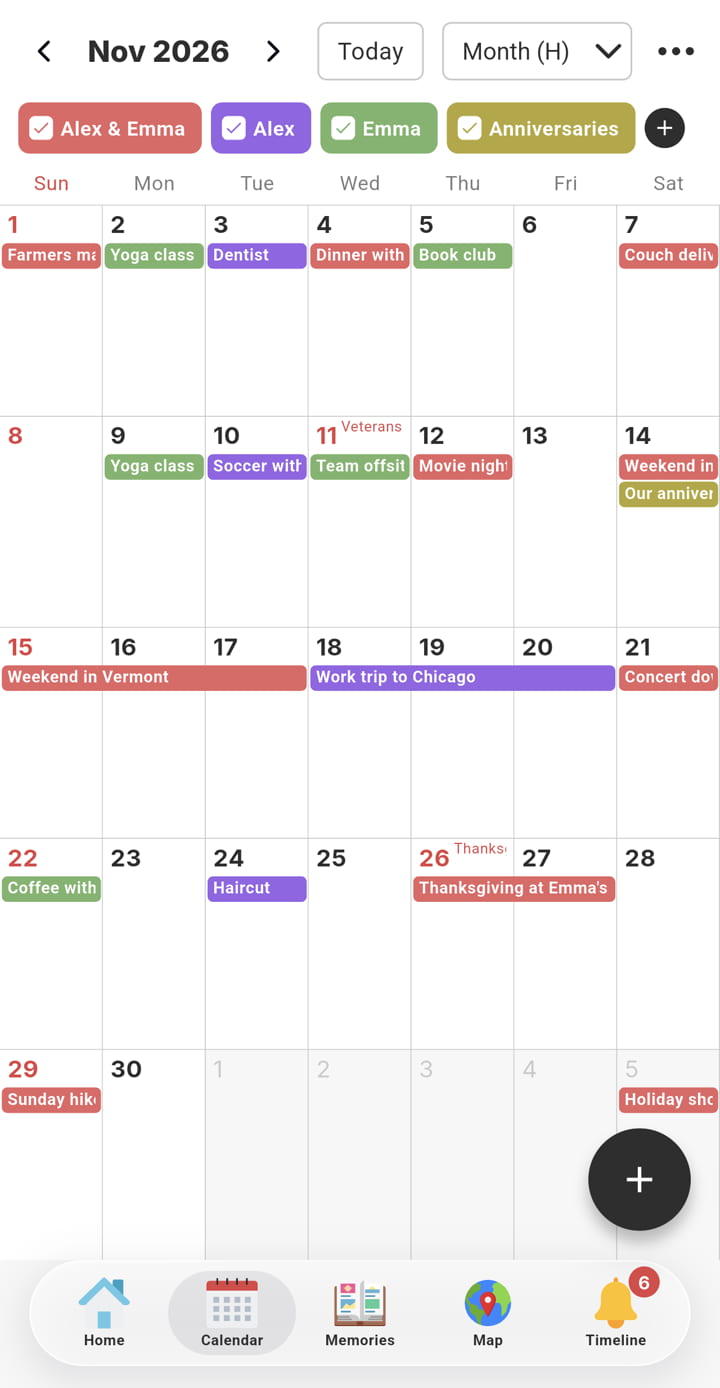
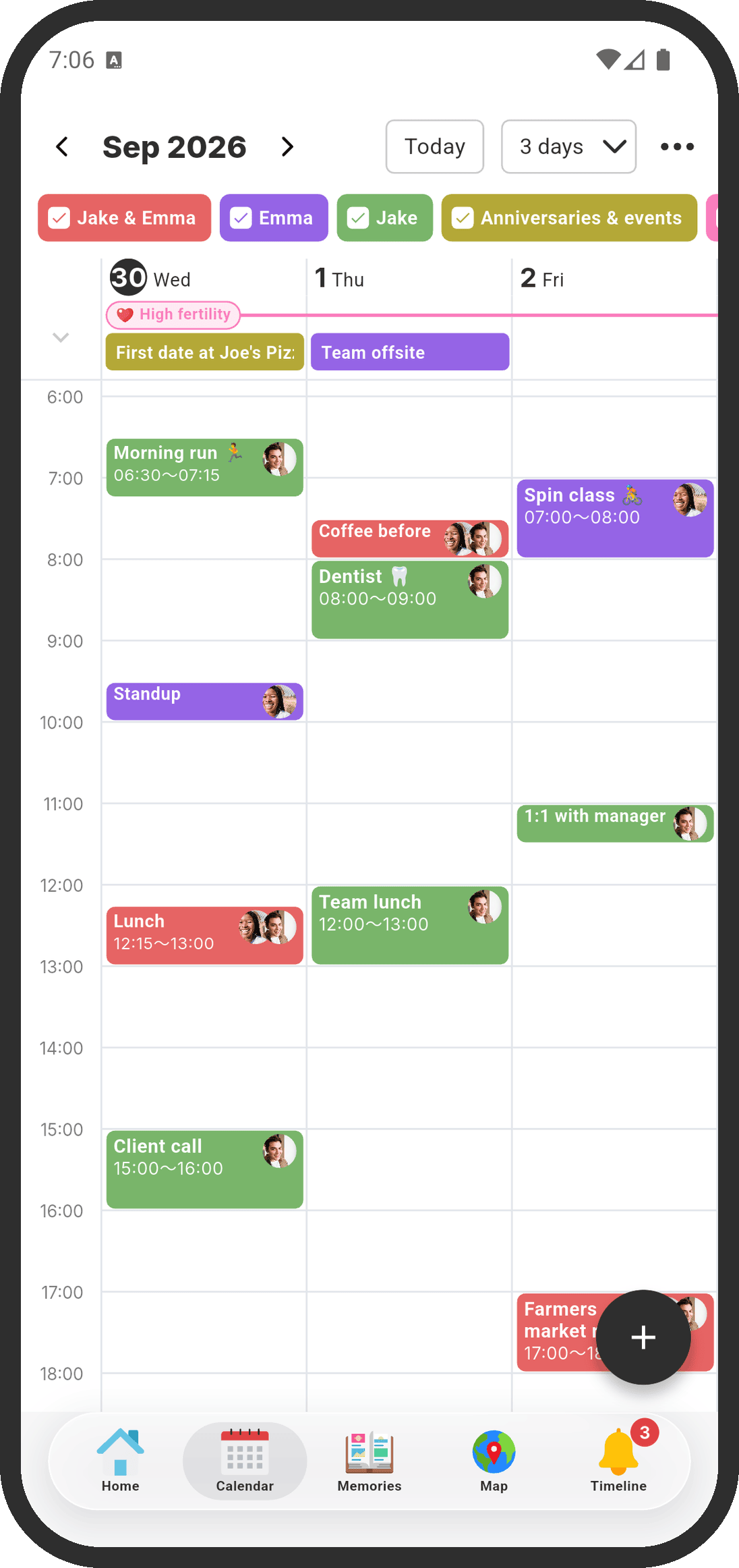
- Views: 1 day, 3 days, week, month, and list, all on the free plan. Drag events to move them or change their length.
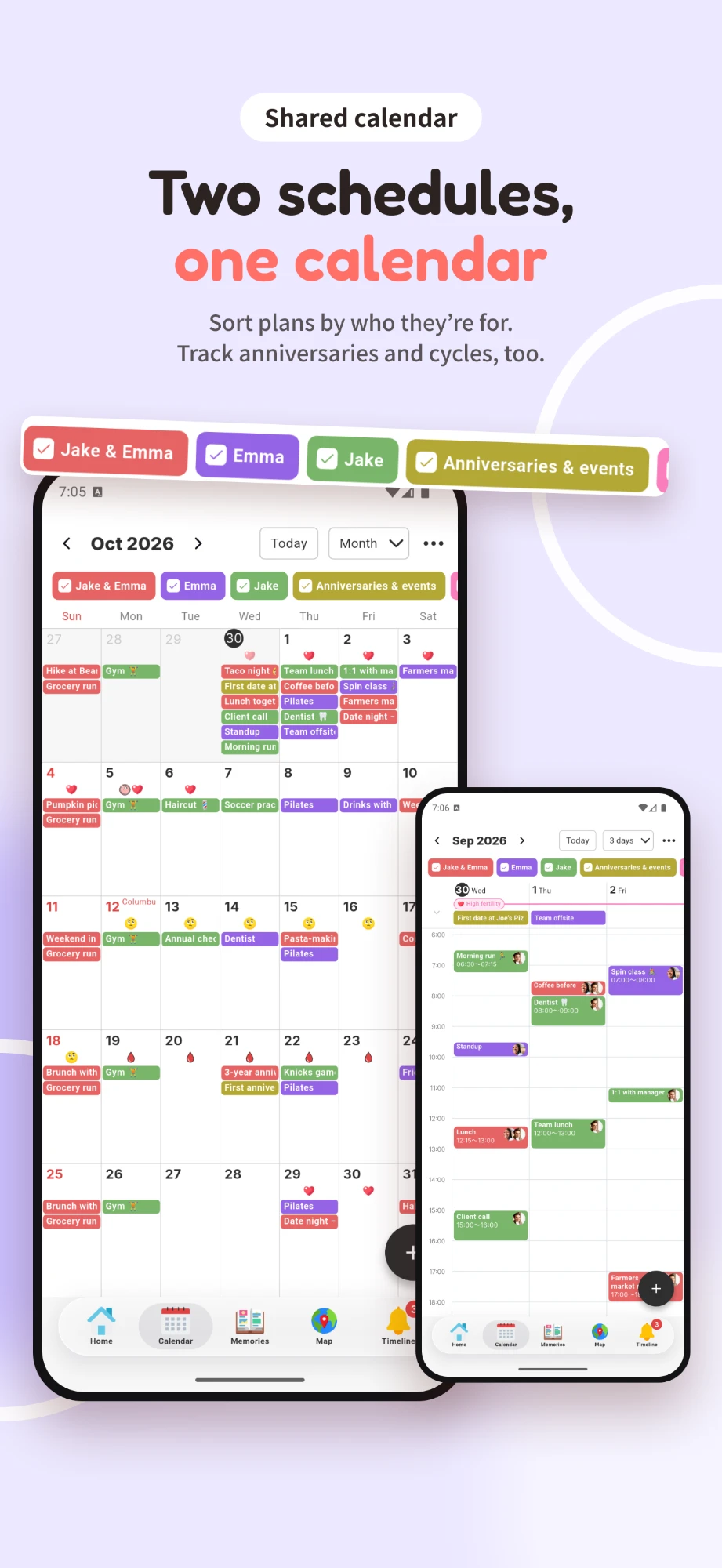
- Whose event: "Our events," "My events" and your partner's events each have their own color, with checkboxes to show or hide each one. You can add custom calendars (2 on the free plan, up to 10 with COUPPLY PRO) for things like shift schedules or family events.
- Talk about an event: each event has a chat icon, so you can discuss it with your partner right there. When one of you changes an event, the other gets an "Updated an event" notification.
- Reminders: event notifications go to both of your phones, and each of you can choose which notifications to receive.
- Bring in other calendars: link your phone's calendar (such as the iPhone Calendar or Google Calendar) and choose "Only me," "Share with partner (time only)," where your partner just sees "Busy," or "Share with partner (everything)." COUPPLY only reads linked calendars and never writes to them. You can also import .ics files.
- Beyond the calendar: anniversaries, countdown reminders, optional period tracking you can share on the calendar, file and photo attachments, and "Create a memory from this" to turn a date into a memory.
Pros: built for two, so setup is minimal. The calendar, chat, lists, and trip plans live in one app. End-to-end encryption means the COUPPLY team can't read your events. Available in English, Spanish, and Japanese, and each partner can use their own language.
Cons: it's only for the two of you, so you can't share a calendar with family or friends. Events from linked calendars can't be edited inside COUPPLY. It's a newer app than most on this list.
| Platforms | iPhone, Android |
|---|---|
| Price | Free to download and use. COUPPLY PRO is optional (more storage, higher limits, no ads); when one partner subscribes, both get PRO. See pricing. |
| Best for | Couples who want their calendar, chat, lists, and memories in one private app |
2. Cupla
Cupla is a shared calendar made specifically for couples. Its main idea is to merge the calendars you already use: it syncs with Apple, Google, and Outlook calendars, work rosters, and shared family calendars, and shows both of your schedules side by side.
- Features: calendar sync, privacy controls for what you share, adding plans to your partner's calendar, shared to-dos and lists with reminders you can assign, wishlists, key dates with countdowns, a date-night goal with reminders, and an AI assistant (Cupla Assist) that can suggest dates and find free time.
- Price model: free to download. Cupla's help center says the free version limits how far ahead you can plan, and Cupla Premium (one subscription per couple, with a free trial) removes that limit.
Pros: strong calendar sync if your work calendars are the problem. Date planning and lists are built in.
Cons: there's no chat on events; Cupla focuses on planning rather than messaging. The free plan limits how far ahead you can see.
| Platforms | iPhone, Android |
|---|---|
| Price | Free; Cupla Premium (one per couple) available |
| Best for | Couples with busy work calendars who want everything merged into one view |
3. TimeTree
TimeTree is a long-running shared calendar for any group. You can create one calendar for the two of you and others for family, friends, or a team.
- Features: multiple shared calendars, chat within events to discuss the details, photos on events, shared memos and to-do lists, shared albums for each group, widgets, and copying or syncing events from your phone's calendar.
- Price model: free with ads. TimeTree Premium removes ads and adds a vertical view of up to 3 days by the hour, file attachments, and event priority.
Pros: one app for every group you share plans with. Talking about an event inside the event keeps plans and details together.
Cons: because it's built for many groups, you choose a calendar when you add an event, which is an extra step if you only share with your partner. The hourly view is a Premium feature.
| Platforms | iPhone, Android, web |
|---|---|
| Price | Free with ads; TimeTree Premium available |
| Best for | Couples who also share calendars with family or friends |
4. Between
Between is one of the longest-running apps for couples. It's mainly a private messenger for two, with a shared calendar where you each share your schedule, special days with automatic countdowns, and a place to keep photos, videos, and notes.
- Features: chat with stickers and GIF selfies, free voice calls, a shared calendar and anniversaries with countdowns, photo and video storage that stays when you change phones, and a desktop version.
- Price model: free with ads. Between Plus (paid, covers both partners) removes ads and adds extras such as themes and longer videos and voice messages.
Pros: chat, calendar, and anniversaries in one app made only for couples, with a long track record.
Cons: it's a messenger first, so the calendar is simpler than in dedicated calendar apps, and its store listing doesn't mention syncing with Google or Apple calendars. Between says its data is encrypted but doesn't say end to end.
| Platforms | iPhone, Android, Windows, Mac |
|---|---|
| Price | Free with ads; Between Plus available |
| Best for | Couples who mainly want a private chat, with dates and anniversaries alongside |
5. OurCal
OurCal is a shared calendar built around messaging. Each event has its own chat thread for photos, files, and notes, and edits are posted as before-and-after updates, so nobody misses a change. It works for groups of 2 to 100 people, and couples on different phones are one of the use cases it highlights.
- Features: a chat on every event, change tracking, a color per member, sync with Google, Apple, and Outlook calendars and subscribed calendars, natural-language event entry, shift (rota) sharing, and separate groups for home, work, or school.
- Price model: a paid subscription with a free trial. There's no free tier, and one subscription covers everyone in the group.
- Privacy: OurCal states that every profile, calendar, event, message, and file is end-to-end encrypted by default.
Pros: event chat and change history are at the center of the app. End-to-end encryption, no ads, and one subscription for both of you.
Cons: no free plan. It's a calendar and chat app rather than an app for your relationship, and its site doesn't mention shared lists, anniversaries, or memories.
| Platforms | iPhone, iPad, Mac, Android |
|---|---|
| Price | Paid subscription (one covers the whole group); free trial |
| Best for | Couples who want end-to-end encrypted event chat and don't mind paying |
6. Google Calendar
Google Calendar is free with a Google account and comes preinstalled on many Android phones. You share a calendar with your partner's email address and choose what they can do, from "See only free/busy (hide details)" to "Make changes and see event details." A common setup is a new calendar called something like "Us" that you both can edit.
- Features: detailed sharing permissions, event invitations, reminders, Google Meet links, attachments from Google Drive, and tasks.
- Price model: free with a Google account.
Pros: free, reliable, and works on iPhone, Android, and the web. It's easy to share with people outside your relationship too.
Cons: it's built for work more than for couples. Google's help explains sharing from a computer, and there's no chat on events, no anniversaries, and nothing for memories.
| Platforms | iPhone, Android, web |
|---|---|
| Price | Free |
| Best for | Couples who already live in Google apps and just need shared time slots |
7. Apple Calendar (iCloud shared calendar)
Apple Calendar comes with every iPhone, iPad, and Mac. You can share an iCloud calendar with your partner and let them edit it, which works well when you both use Apple devices.
- Features: shared iCloud calendars with or without editing, alerts, notifications when a shared calendar changes, and syncing across Apple devices. Shared lists live in a separate app (Reminders).
- Price model: free with an Apple Account.
Pros: nothing to install if you both have iPhones. It's tightly integrated with Siri, widgets, and the Apple Watch.
Cons: it's Apple-only in practice. A partner without an Apple device can only subscribe to a public, read-only link and can't add events. There's no chat on events. Apple's own support page lists iCloud Calendar as not end-to-end encrypted, even with Advanced Data Protection.
| Platforms | iPhone, iPad, Mac (read-only public link for others) |
|---|---|
| Price | Free |
| Best for | Couples who both use iPhones and want zero setup |
8. Howbout
Howbout is a social calendar for friends, couples, and families. You share your calendar, or only your availability, see when people are free, and turn that into a plan. Its store listing names couples as one of its main uses: staying in sync, planning dates faster, and not double-booking each other.
- Features: see when everyone's free, share your full calendar or just your availability, plans with chats, locations, notes, and photos, real-time notifications when plans change, calendar sync, and home-screen widgets.
- Price model: free. Howbout+ (paid) adds customization such as colors and themes, plus extra planning tools.
Pros: ideal when your weekends fill up with friends' plans. Sharing only your availability keeps details private.
Cons: it's built around social plans and friend groups more than a private space for two, and its listing doesn't mention shared lists or anniversaries.
| Platforms | iPhone, Android |
|---|---|
| Price | Free; Howbout+ available |
| Best for | Couples with busy social lives who also plan with friends |
9. Cozi
Cozi is a family organizer. It brings a shared calendar together with shopping lists, to-do lists, a meal planner, and a recipe box, and each person's events are color-coded.
- Features: shared family calendar, real-time shopping and to-do lists, meal planning that sends ingredients to your shopping list, and agenda emails. It can sync with Google, Outlook, and Apple calendars.
- Price model: free with ads, with paid Cozi Gold and Cozi Max plans. Gold removes ads and adds month view on mobile, events more than 30 days ahead, calendar search, change notifications, and a birthday tracker; Max adds AI features such as event import and meal planning.
Pros: lists and meal planning are especially strong, which helps couples who share a home.
Cons: it's designed around a family, not a couple: the whole family shares one account and password. On the free plan you can only add and view events up to 30 days ahead; month view on mobile and change notifications need Cozi Gold. There's no chat on events.
| Platforms | iPhone, Android, web |
|---|---|
| Price | Free with ads; Cozi Gold and Cozi Max available |
| Best for | Couples who live together (or with kids) and plan meals and groceries together |
Comparison table
"Not stated" means we couldn't find the information on the app's official site or store listing. It doesn't mean the feature is missing or your data is unsafe.
| App | iPhone & Android | Made for couples | Chat or comments on events | Lists & to-dos | Free plan | E2EE |
|---|---|---|---|---|---|---|
| COUPPLY | Yes | Yes | Yes (chat on each event) | Yes | Yes | Yes |
| Cupla | Yes | Yes | No | Yes | Yes (limited view ahead) | Not stated |
| TimeTree | Yes | No (any group) | Yes (chat within events) | Yes (memos and to-dos) | Yes (with ads) | Not stated |
| Between | Yes | Yes | Chat app (not per event) | Not stated | Yes (with ads) | Not stated |
| OurCal | Yes | No (groups of 2 to 100) | Yes (chat on each event) | Not stated | No (free trial) | Yes (per OurCal) |
| Google Calendar | Yes | No | No | Yes (tasks) | Yes | Not stated |
| Apple Calendar | No (Apple devices only) | No | No | Separate app (Reminders) | Yes | No (per Apple) |
| Howbout | Yes | No (friends, couples, families) | Yes (chats on plans) | Not stated | Yes | Not stated |
| Cozi | Yes | No (families) | No | Yes | Yes (with ads, 30 days ahead) | Not stated |
Which couples calendar app should you pick?
- You have different phones (iPhone + Android): any app here except Apple Calendar.
- You want one private app for your relationship: COUPPLY. The calendar sits next to chat threads, lists, trip plans, and memories, and it's end-to-end encrypted. Between is the alternative if you mostly want a chat app with dates.
- Your work calendars are the problem: Cupla merges Google, Apple, and Outlook calendars. COUPPLY can also show your work calendar to your partner as "Busy" only.
- Privacy matters and you're happy to pay: OurCal, which states end-to-end encryption and has no ads. COUPPLY offers end-to-end encryption on its free plan.
- You share plans with family and friends too: TimeTree for many shared calendars, or Howbout if most of your plans are with friends.
- You live together and plan meals: Cozi, for its shopping lists and meal planner.
- You both have iPhones and want nothing new to install: a shared iCloud calendar in Apple Calendar.
- You only need to know when the other is free: Google Calendar with "See only free/busy (hide details)."
Whichever you choose, agree on two simple rules early: who adds shared plans, and whether a plan counts as "confirmed" once it's on the calendar. The app matters less than both of you checking it.
How to set up a shared calendar for couples (iPhone, Android, and Google)
If you'd like to start with what's already on your phones, here's how to share a calendar with your partner in the two most common calendars, and what changes with a couples app.
On iPhone (Apple Calendar)
- Open the Calendar app and tap Calendars.
- Tap the info button next to the iCloud calendar you want to share (or create a new one called "Us").
- Tap Add Person, enter your partner's email address, and send the invitation.
- Once they accept, they can add and edit events. To make it view-only, tap their name and turn off Allow Editing.
This only works fully if you both use Apple devices. A partner on Android can only subscribe to a public, read-only version.
In Google Calendar (iPhone + Android)
- On a computer, open Google Calendar. Under My calendars, click More next to the calendar, then Settings and sharing.
- Under Shared with, click Add people and groups and enter your partner's email address.
- Choose the access level. For a calendar you both manage, pick Make changes and see event details; to show only when you're busy, pick See only free/busy (hide details).
- Click Send. Your partner adds the calendar from the link in the email, and it then appears in Google Calendar on their phone.
In a couples calendar app
In apps made for couples, such as COUPPLY, Cupla, or Between, you connect your accounts once and the calendar is shared from then on. In COUPPLY, you can also link the calendar already on your phone and choose, for each linked calendar, whether your partner sees nothing, only "Busy" time blocks, or everything.
Sharing your period tracker
Some couples also search for a way to share a period calendar with their partner. In COUPPLY, period tracking lets you choose separately what you see and what your partner sees (predicted period, ovulation day, fertility, and PMS), and the shared items appear on your shared calendar. When a period starts, you're asked whether to notify your partner, and nothing is sent unless you choose to.
How we researched this
We started from the apps that come up again and again in current top-ranking articles for "shared calendar for couples" and "couples calendar app." For each one, we checked the official website or help center, the App Store listing, and the Google Play listing in late October 2026: whether it's on both stores, when it was last updated, its main features, and its price model.
We left out apps that haven't been updated in about 18 months or more (Raft, for example, which is also iPhone-only) and apps that have shut down. We didn't run hands-on tests or rank apps by store ratings, and the order after COUPPLY isn't a ranking. Features and prices change, so check the store listing before you subscribe.
FAQ
What is the best shared calendar app for couples?
It depends on what else you want from the app. For a calendar built for two, with chat on each event, shared lists, anniversaries, and end-to-end encryption, try COUPPLY. To merge the work calendars you already use, look at Cupla. If you mostly want a private chat app with dates and anniversaries, Between fits. If you also plan with family or friends, TimeTree, Howbout, or Cozi fit better, and if you both live in Google or Apple apps already, their built-in calendars may be enough.
Is there a free shared calendar app for couples?
Yes. COUPPLY is free to download and use, and COUPPLY PRO is an optional subscription for more storage and higher limits. Cupla, TimeTree, Between, Howbout, and Cozi have free plans with paid upgrades, and Google Calendar and Apple Calendar are free. OurCal is the exception: it's a paid subscription with a free trial.
Can we share a calendar if one of us has an iPhone and the other has an Android phone?
Yes. Every app in this list except Apple Calendar works on both iPhone and Android. Shared iCloud calendars are designed for Apple devices, and a partner without one can only subscribe to a public, read-only link.
How do I share my calendar with my partner on iPhone?
If you both use Apple devices, open the Calendar app, tap Calendars, tap the info button next to an iCloud calendar, tap Add Person, and enter your partner's email address. They can edit the calendar unless you turn off Allow Editing. If your partner uses Android, share a Google Calendar from a computer instead, or use an app that works on both phones.
Can I show my partner when I'm busy without sharing my work events?
Yes. In COUPPLY, link your phone's work calendar and choose Share with partner (time only). Your partner sees the time blocks as Busy, without event names, notes, or places. Google Calendar has a similar See only free/busy (hide details) permission, Howbout lets you share only your availability, and Cupla offers privacy controls for what you share.
Can I share my period tracker with my partner on the calendar?
In COUPPLY, yes. Turn on period tracking and choose which predictions your partner can see: predicted period, ovulation day, fertility, and PMS. What you share shows on the shared calendar, and you can change it at any time. None of the other apps in this list include a period tracker.
Are shared calendar apps end-to-end encrypted?
Most don't say so. COUPPLY and OurCal both state that what you save is end-to-end encrypted, so the company can't read it. Apple states that iCloud Calendar isn't end-to-end encrypted, even with Advanced Data Protection. Between says its data is encrypted but doesn't say end to end, and Cupla, TimeTree, Google Calendar, Howbout, and Cozi don't state end-to-end encryption on their sites.
What is the best private app for couples with a shared calendar?
If privacy comes first, pick an app that states end-to-end encryption. Of the nine apps here, only COUPPLY and OurCal do. COUPPLY is free, made for two, and available on iPhone and Android. It keeps the calendar next to chat, lists, and photos, all end-to-end encrypted. OurCal is a paid subscription with a free trial and focuses on the calendar and chat on events.
What are the most affordable shared calendar apps for couples?
Google Calendar and Apple Calendar are free, but Apple Calendar only works if you both use Apple devices. COUPPLY, Cupla, TimeTree, Between, Howbout, and Cozi are free to start, with optional paid plans; some free plans show ads or limit how far ahead you can plan. OurCal is the only app here without a free plan. Paid prices vary by country and store, so check the listing in your app store.
Wrap-up
Any of these nine apps can hold a shared schedule. The right shared calendar for couples depends on your phones, who else you plan with, and whether you want a calendar on its own or as part of a space for your relationship. Google and Apple calendars are free and familiar, TimeTree, Howbout, and Cozi suit wider groups and households, Cupla is strong at merging work calendars, Between is chat-first, and OurCal puts encrypted event chat at the center.
If you'd like your events, the conversations about them, your lists, and your memories in one end-to-end encrypted app, give COUPPLY a try. It's free, works on iPhone and Android, and you can set it up with your partner in a few minutes.