Relationship Day Counter and Anniversary Reminder Apps for Couples
A relationship day counter app shows how many days you've been together and counts down to your next anniversary, so neither of you is caught off guard. The best couple day counter apps are shared with your partner, send an anniversary reminder ahead of time, and put the count on your home screen or Lock Screen as a widget.
This guide explains how to work out how many days you've been together, the milestones couples like to count, a simple system for never missing an anniversary, what to look for in an app, and six options compared side by side, from dedicated counters to the calendar already on your phone.
Disclosure: COUPPLY is made by us. We list it first, but we describe every other app from its official website or store listing, and we point out where another app may suit you better.
Key takeaways
- To count your days together, subtract your start date from today. Decide together whether the first day is day 0 or day 1.
- Popular milestones: 100 days, 6 months, 1 year, 500 days, 1,000 days, and monthly anniversaries (monthiversaries).
- To never miss one, keep anniversaries in a place you both see, get a heads-up days or weeks before, and keep a countdown where you'll see it every day.
- Many counter apps work on one phone only. If you want the same dates and reminders on both phones, pick an app built for two.
- COUPPLY keeps anniversaries in a shared calendar with count up, countdown, reminders, and widgets, free on iPhone and Android. If you just want a cute counter, The Couple, Been Together, or Been Love Memory are simple options.
How many days have we been together? How to count
The math is simple: subtract the day you got together from today's date. From January 1, 2026 to October 30, 2026, for example, is 302 days. Doing it by hand gets fiddly, though, because months have different lengths and leap years add a day. That's why most couples use a day counter app or an online date calculator.
Two things to agree on before you start counting:
- Day 0 or day 1? Most date calculators treat your first day as day 0, so the example above is day 302. Some counter apps count the first day as day 1, which makes it day 303. Neither is wrong, but if you're celebrating "100 days," it helps to use the same rule.
- Which start date? The day you met, your first date, the day you made it official, or your wedding day. You can track more than one; many married couples keep both their dating anniversary and their wedding anniversary.
In counter apps you'll often see the count written as "D+302": D+ means days since your start date, and D- means days left until an upcoming date.
Milestones couples count
Every couple counts a little differently, but these are the dates that come up most often. All of them start from the day you got together (or the day you married, if that's the date you prefer).
- 100 days: a little over three months in. It's an early milestone that's easy to celebrate with a small gift or a favorite dinner.
- 6 months: half a year together, often the point where a relationship starts to feel settled.
- 1 year and every year after: the classic anniversary. If you're married, you may track your dating anniversary and your wedding anniversary separately.
- 500 days: about one year and four and a half months. It's a fun "bonus" milestone that sneaks up on most people.
- 1,000 days: about two years and nine months. A big round number that's worth a card or a trip.
- Monthly anniversaries: the same date every month. Monthiversaries are especially popular in the first year, and in some cultures, celebrating them is a common tradition, so ask your partner whether they care about them.
Day-count milestones (100, 500, 1,000) are the hardest to keep track of, because they don't fall on the same date as your anniversary. That's exactly where a relationship day counter app earns its place.
How to never miss an anniversary
Forgetting an anniversary is rarely about not caring. It's usually because the date lives in one person's head. Three habits fix most of that.
- Keep anniversaries in one shared place. When both of you see the same list, there's no "I thought you had it." It also saves entering the same date twice.
- Set an anniversary reminder well in advance. A notification on the day is too late to book a restaurant or order a gift. Aim for a heads-up one to four weeks before a yearly anniversary, and a few days before a monthiversary.
- Keep a countdown where you'll see it. A couple widget on your home screen or Lock Screen keeps the date on your mind without any effort. Seeing "12 days to go" is a gentle nudge to start planning.
It also helps to save the other dates that matter to you both: each other's birthdays, your parents' birthdays, and family anniversaries. They're easy to forget and nice to remember together.
What to look for in a couple day counter app
- Shared with your partner, or solo: a solo counter is fine if you just want to see your number. If you want both of you to get the same reminders, choose an app that connects two accounts.
- Count up and countdown: count up shows how long you've been together ("D+302"); countdown shows how long until the next anniversary. Good apps do both.
- Anniversary reminders: check whether you can be notified before the day, not just on it, and whether your partner gets the notification too.
- Widgets: a home screen or Lock Screen widget is the easiest way to see your count every day. Check which widgets work on iPhone and which on Android, since they often differ.
- Both platforms: if one of you has an iPhone and the other an Android phone, make sure the app runs on both.
- More than birthdays: monthly repeats for monthiversaries, and room for other dates such as family birthdays.
- Ads and paid plans: many free counters show ads. If a paid plan removes them, check whether it also covers your partner.
6 relationship day counter and anniversary reminder apps
App details below are from each app's official website or store listing, checked on October 30, 2026. Features and pricing can change, so check the listing before you download.
1. COUPPLY
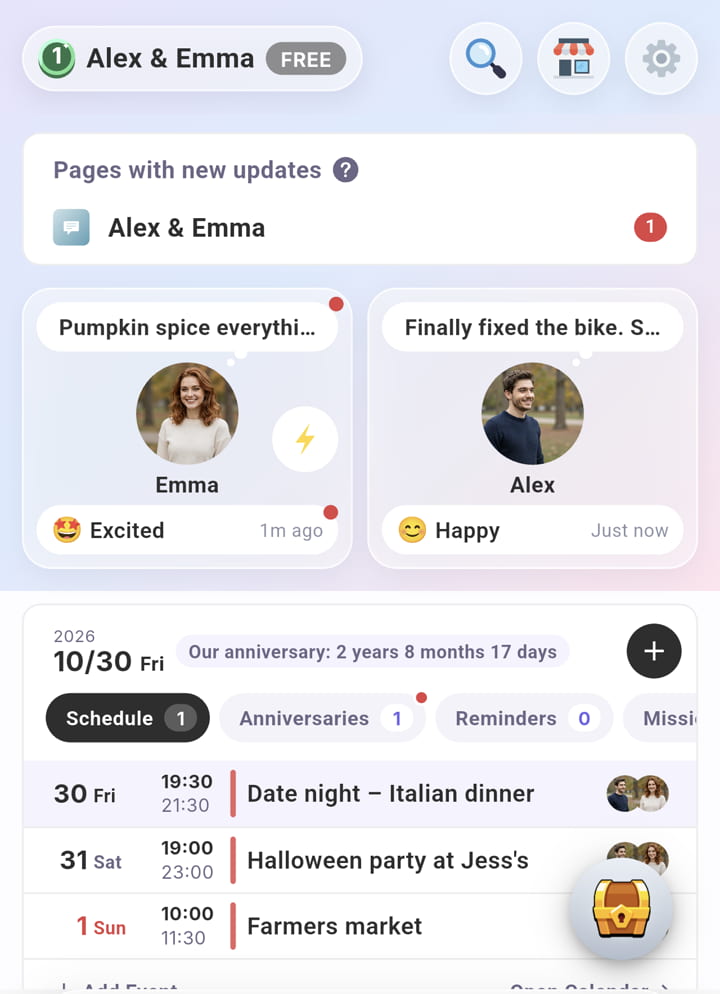
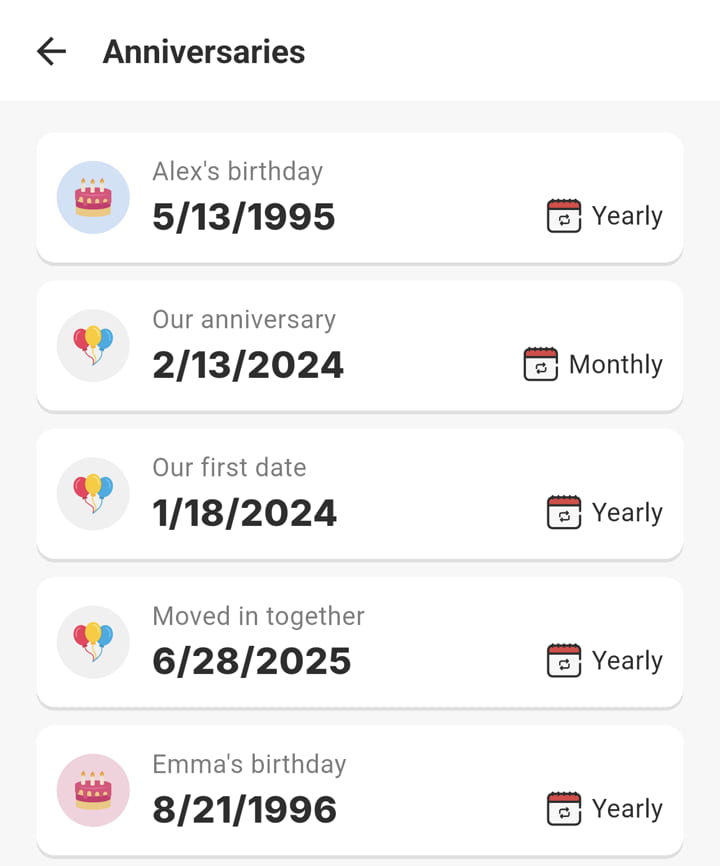
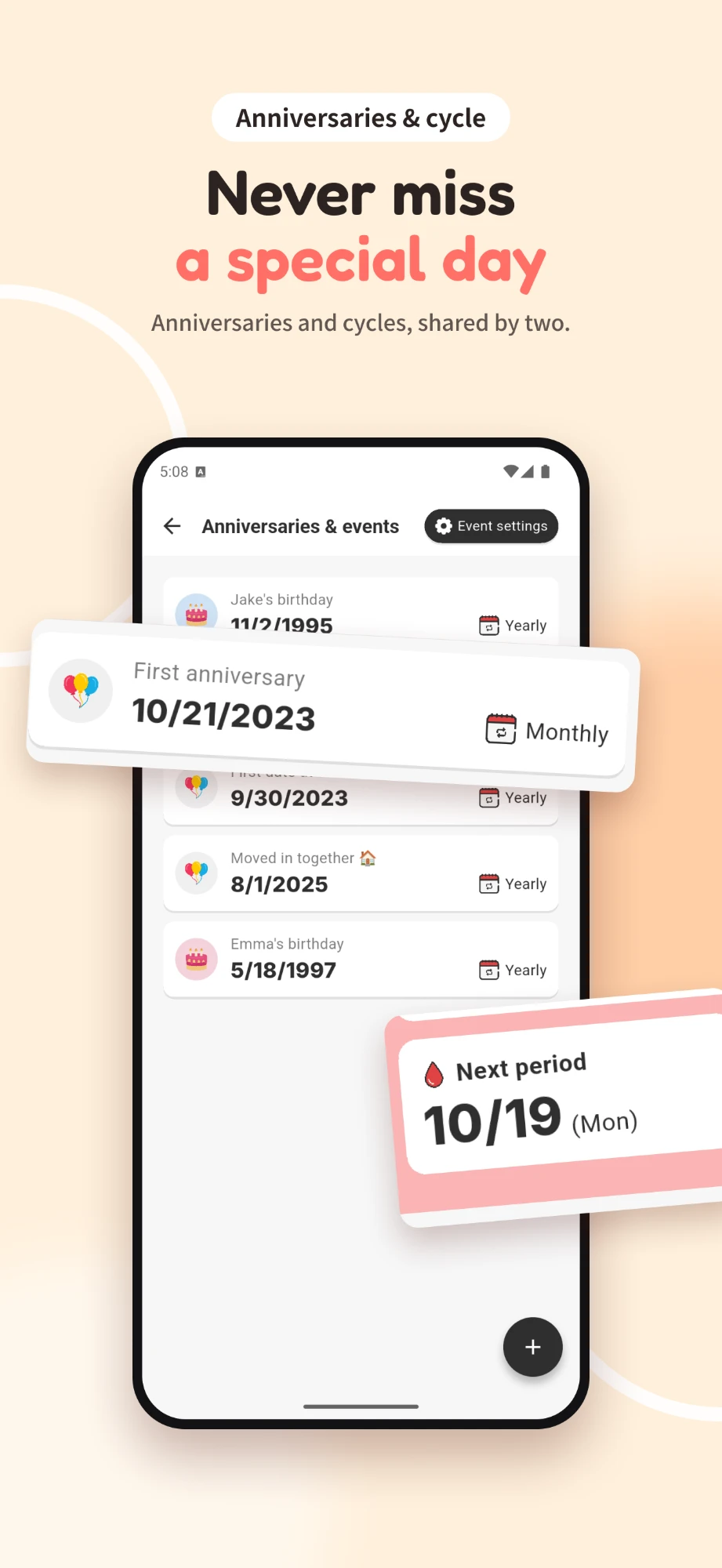
COUPPLY is an all-in-one app for couples, and anniversaries are part of its shared calendar rather than a separate app. Your birthdays, the day you started dating, and your wedding anniversary are added automatically from your profiles, and you can add any other date, such as family birthdays or a death anniversary. For each one, choose whether it repeats every month or every year, so monthiversaries take a single tap.
Anniversaries appear on the shared calendar and on the Home screen of both partners. A countdown shows up on Home one month before a yearly anniversary and two weeks before a monthly one. In Custom mode, Home screen widgets let you pin countdowns to the anniversaries you choose, or show one anniversary in large type, counting down or counting up. On iPhone, a Lock Screen widget shows how long it's been since your anniversary.
For a notification ahead of time, add a reminder such as "Book dinner for our 1,000 days" with a due date. Reminders show a countdown and can notify both of you, only you, or only your partner. Each anniversary also collects the memories from that day, so you can look back on past celebrations. Everything you save is protected with end-to-end encryption.
| Platforms | iPhone, Android |
|---|---|
| Price | Free. Optional COUPPLY PRO subscription (one partner subscribes, both get PRO) |
| Best for | Couples who want anniversaries, a shared calendar, and reminders in one private app |
Things to know: COUPPLY does a lot more than count days (chat threads, lists, a photo album, an AI counselor), which may be more than you need if you only want a counter. The anniversary and countdown widgets are in Custom mode, and the Lock Screen widget is iPhone only.
2. Between
Between is one of the longest-running private apps for couples, now run by DLT Partners Inc. Its official site describes one private space where you chat, share photos and videos, keep a shared calendar, and "save and track all your special days." According to its App Store listing, it automatically calculates countdowns for your shared calendar and special days. It's available on iPhone, Android, Windows, and Mac.
| Platforms | iPhone, Android, Windows, Mac |
|---|---|
| Price | Free; optional Between Plus subscription or one-time purchase (no ads, extra features for both partners) |
| Best for | Couples who want chat, photos, and anniversaries in one well-known app |
Things to know: the official site and listing don't describe a count-up display, advance reminders, or widgets, so check the current store listing if those matter to you.
3. The Couple (Days in Love)
The Couple (Days in Love) by TheDayBefore, Inc. is a dedicated relationship day counter. According to its App Store listing, it tracks milestones from day one, such as D+100 and your 1st and 2nd anniversaries, lets you set custom reminders for birthdays and anniversaries, and offers Home Screen and Lock Screen widgets in several sizes and styles. It also has a couple diary for photos and memos that only the two of you can see.
| Platforms | iPhone, Android |
|---|---|
| Price | Free with ads; paid plans available (a subscriber's partner gets the same benefits, per the listing) |
| Best for | Couples who mainly want a good-looking counter and widgets |
Things to know: the free version shows ads. It focuses on counting and a diary, so you'll still need another app for a shared calendar or lists.
4. Been Together
Been Together by Been Together Inc. is a "D-Day" counter for couples that has been around since 2012. Its App Store listing says it tracks the days you've spent together along with birthdays and other important dates, and sends reminders for milestones such as your 100th day or first anniversary. You can also create a shared "Lounge" for an anniversary, invite someone special, and post stories there together.
| Platforms | iPhone, Android |
|---|---|
| Price | Free with ads; in-app purchases available |
| Best for | Couples who want a simple counter with milestone reminders |
Things to know: the store listings are labeled "(Ad)," so expect ads in the free version. The listing doesn't mention widgets.
5. Been Love Memory
Been Love Memory - Love Counter is a simple counter that shows how many days you've been together, with a home screen widget that can include your photos, custom themes, and a list of important anniversaries and holidays. Its listing also mentions a daily notification with your day count. It's a long-standing app available on iPhone and Android.
| Platforms | iPhone, Android |
|---|---|
| Price | Free (Google Play lists ads and in-app purchases) |
| Best for | Anyone who wants a personal day counter on their own phone |
Things to know: the listing doesn't describe connecting with your partner, so each of you sets it up on your own phone. The developer name differs between the App Store and Google Play, and several apps have similar names, so check the listing carefully before you download.
6. Google Calendar or Apple Calendar
If you don't want another app, create an all-day event on your anniversary and set it to repeat every year (or every month for monthiversaries), then add an alert one or two weeks before. Put it on a calendar you share with your partner and you'll both see it. The catch: a calendar won't count up how many days you've been together, and it won't find your 100th or 1,000th day for you.
| Platforms | Google Calendar: iPhone, Android, web. Apple Calendar: Apple devices |
|---|---|
| Price | Free |
| Best for | Couples who already share a calendar and just need yearly reminders |
Comparison table
"Not stated" means we couldn't confirm the feature on the official site or store listing.
| App | Shared with partner | Count up | Countdown | Reminders | Widget | Free |
|---|---|---|---|---|---|---|
| COUPPLY | Yes | Yes | Yes | Home countdown + reminders with notifications | Yes (in-app Home, iPhone Lock Screen) | Yes (optional PRO) |
| Between | Yes | Not stated | Yes | Not stated | Not stated | Yes (optional Plus) |
| The Couple | Yes | Yes | Yes | Yes, custom | Yes (Home and Lock Screen) | Yes, with ads (paid plans) |
| Been Together | Shared Lounge (invite) | Yes | Yes | Yes, milestones | Not stated | Yes, with ads |
| Been Love Memory | No (one phone) | Yes | Not stated | Daily count notification | Yes (home screen) | Yes |
| Google / Apple Calendar | Yes, with a shared calendar | No | No | Yes, event alerts | Calendar widget | Yes |
How we researched this
We started from the apps that come up most when you search for a relationship day counter app or an anniversary reminder app, then checked each one's official website, App Store listing, and Google Play listing on October 30, 2026, including when it was last updated. We kept apps that run on both iPhone and Android and have been updated within roughly the last 18 months. That's why some well-known counters aren't here: My Love - Relationship Counter, for example, is iPhone only and was last updated in 2023.
We didn't rank the apps by hands-on testing. Everything we say about other apps is what their developers state, and we've flagged anything we couldn't confirm.
FAQ
How do I calculate how many days we've been together?
Subtract the date you got together from today's date. For example, from January 1, 2026 to October 30, 2026 is 302 days. Some people count the first day as day 1, which would make it day 303, so decide which way you count. A day counter app does the math for you and handles leap years and month lengths automatically.
When is our 100-day, 500-day, and 1,000-day anniversary?
100 days is a little over three months, 500 days is about one year and four and a half months, and 1,000 days is about two years and nine months after the day you got together. The exact date depends on the months and leap years in between, so use a day counter app or a date calculator to find it, then save it with a reminder.
What is a monthiversary, and should we celebrate it?
A monthiversary (also spelled monthversary) is the same date each month as the day you got together, for example the 14th of every month. Many couples mark them in the first year, and in some countries they are a common tradition. There is no rule: celebrate if it feels fun, and choose a monthly repeat in your app so you don't have to remember.
Is there an app that counts our days together on both of our phones?
Yes, but only if the app is shared between partners. Many day counter apps run on one phone only, so each of you has to enter the date separately. Couples apps such as COUPPLY, Between, and The Couple are designed for two people, so you both see the same anniversaries.
Can I put a couple day counter widget on my home screen or Lock Screen?
Yes. Most dedicated counters offer a home screen widget, and some, such as The Couple, also have Lock Screen widgets. In COUPPLY, countdown and count-up widgets sit on the app's own Home screen in Custom mode, and on iPhone a Lock Screen widget shows how long it's been since your anniversary.
Is COUPPLY free?
Yes. COUPPLY is free to download and use on iPhone and Android, including anniversaries, the shared calendar, and reminders. COUPPLY PRO is an optional subscription that adds more storage, higher limits, more from the AI counselor, and no ads. When one partner subscribes, both of you get PRO.
Wrap-up: count together, plan ahead
The right app depends on what you want from it. If you just want to see your number every day, a dedicated counter like The Couple, Been Together, or Been Love Memory does the job. If you already share a calendar, a yearly repeating event with an early alert is enough for the big dates.
If you want your anniversaries, your shared calendar, and your reminders in one place that you both see, try COUPPLY. Set your dating anniversary once, choose monthly or yearly, add a reminder for the 100th or 1,000th day, and let the countdown on COUPPLY's Home screen do the remembering. It's free on iPhone and Android, and each of you can use the app in English, Spanish, or Japanese.