Best Shared Grocery List and To-Do List Apps for Couples (2026)
The best shared grocery list app is the one you'll both actually open. For groceries only, apps like OurGroceries, Bring!, Listonic, and AnyList are hard to beat. If you also want a shared to-do list app for couples, one that splits chores, sets due dates, and keeps everything in one private space for the two of you, a couples app like COUPPLY does more of the work.
The real problem usually isn't the app. It's splitting chores and groceries without nagging: one of you ends up as the household manager who remembers the milk, the dentist appointment, and the overdue bill, and the other gets the reminders. A shared list fixes that only if it shows clearly who's doing what and by when.
Below you'll find a simple system for sharing chores and shopping as a couple, what to look for in an app, and ten apps that work on both iPhone and Android, with honest pros and cons.
Disclosure: COUPPLY is made by us. We list it first, but we describe the other apps based on their official sites and store listings, and we point out where they're a better fit.
Key takeaways
- Use one shared list per purpose (groceries, chores, errands), not one giant list.
- Every task needs an owner and, when it matters, a due date. That's what ends the nagging.
- Grocery apps (AnyList, OurGroceries, Bring!, Listonic) are great in the store but don't handle chores well.
- Task apps (Todoist, Microsoft To Do, Any.do) handle chores well but aren't built for couples.
- COUPPLY combines lists with owners and due dates, a shared calendar, and chat, with end-to-end encryption.
How to split chores and groceries with your partner (without nagging)
Before you pick an app, agree on how you'll use it. This five-step system works with almost any shared list app.
- One shared list per purpose. Keep "Groceries," "Household chores," "Errands," and "Trip packing" separate. A single list that mixes paper towels with "renew passport" gets ignored fast.
- Assign every task. "Clean the bathroom" with no name on it belongs to whoever notices first, which is usually the same person every time. Put a name on it, or mark it as something you'll do together.
- Add due dates to what matters. Groceries don't need dates. Bills, appointments, and gifts do. A due date replaces "Did you remember to…?"
- Check it off where your partner can see it. Completing a task in the shared list tells your partner it's done, without a text or a reminder.
- Do a weekly reset. Once a week, spend 10 minutes together: clear finished tasks, reassign anything stuck, and add next week's shopping. Tasks that sit for weeks should be scheduled, handed over, or deleted.
The point isn't to keep score. It's to make the invisible work visible, so planning doesn't quietly land on one person.
What to look for in a shared grocery list or to-do list app
- Works on iPhone and Android: if one of you has an iPhone and the other Android, the app must support both. That rules out Apple Reminders and Apple Notes.
- Real-time sync: when one of you adds eggs at home, the other should see it in the store right away.
- Multiple lists: separate lists for groceries, chores, and trips.
- Owners and due dates: essential for chores, optional for groceries.
- Notifications: knowing your partner added or bought something stops you from buying the same thing twice.
- Grocery extras: aisle sorting, recipes, and meal planning matter if you cook a lot.
- Privacy: a list shows your habits, health purchases, and plans. Check whether the app says how your data is protected.
- Everything else in one place: a calendar and a chat next to your lists mean fewer apps to juggle.
10 shared grocery list and to-do list apps for couples
Features and price models come from each app's official site, help pages, and store listings, checked in late October 2026. Prices vary by country and store, so we don't list exact amounts.
1. COUPPLY
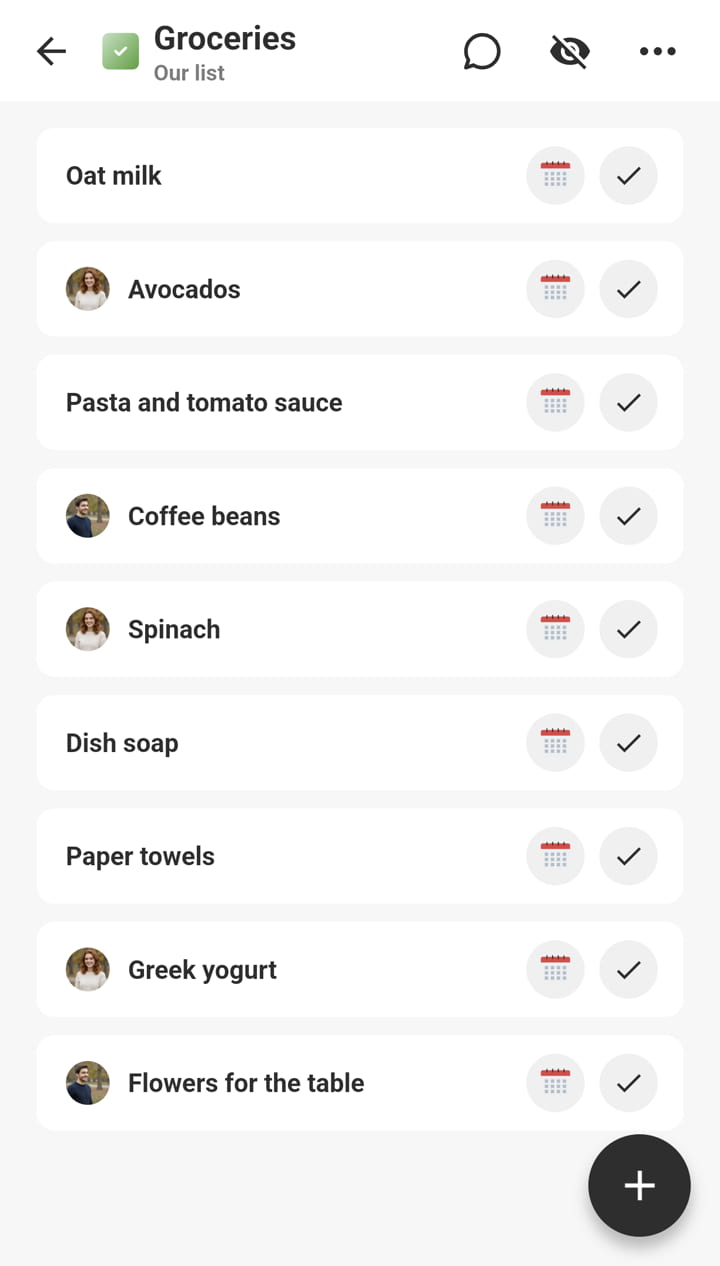
COUPPLY is an app for couples that puts your shared lists next to a shared calendar, chat threads, a Wiki, and a photo album. With Lists, you can make as many lists as you like: groceries, chores, a packing list, or the steps for a move.
Each task can have an assignee (you, your partner, both of you, or no one), a due date, a color label, subtasks, and comments. When your partner adds or completes a task, you get a push notification, so you don't buy the same thing twice. The "By due date" tab shows unfinished tasks from all your lists in order, and you can switch to a calendar view and drag a task to a new date. Tasks with no due date that sit too long are flagged as "stale tasks" so you can review them, which fits the weekly reset nicely.
Your lists are protected with end-to-end encryption, so the COUPPLY team can't read them. The app is available in English, Spanish, and Japanese, and each of you can use your own language.
| Platforms | iPhone, Android |
|---|---|
| Price | Free to download and use. COUPPLY PRO (optional subscription) removes the 30-tasks-per-list limit, adds storage, and removes ads; when one partner subscribes, both get PRO. See pricing. |
| Best for | Couples who want chores, groceries, and plans in one private space |
| Pros |
|
| Watch out for |
|
2. AnyList
AnyList is a grocery list and recipe app. Share a list with your partner and watch items get checked off in real time as they shop. Lists sort into categories you can rearrange to match your store, and you can add items with Siri or Alexa. It's especially strong for couples who cook: save recipes from websites and add a recipe's ingredients to your list in one tap.
| Platforms | iPhone, iPad, Android (Mac, PC, and Apple Watch with Complete) |
|---|---|
| Price | Free; AnyList Complete (paid, individual or household) adds the meal planning calendar, item prices, store filters, recipe scaling, and more |
| Best for | Couples who cook and plan meals together |
| Pros |
|
| Watch out for |
|
3. OurGroceries
OurGroceries does one thing well: a shared shopping list for your household. Enter the same email address in each copy of the app, and every change shows up within seconds on your partner's phone. It sorts items by aisle, can add an item from a photo or a barcode, adds a recipe's ingredients in one tap, and works with Alexa, Apple Watch, and a web browser.
| Platforms | iPhone, Android, Apple Watch, web |
|---|---|
| Price | Free with ads; a paid upgrade removes ads |
| Best for | Couples who just want a simple, fast grocery list |
| Pros |
|
| Watch out for |
|
4. Bring!
Bring! is a colorful shopping list app that's popular in Europe. Shared lists sync in real time, and everyone on the list gets a notification when items are added or bought. Items are grouped automatically, you can match categories to your store's aisles, save recipes, and add current store offers straight to your list.
| Platforms | iPhone, Android, Apple Watch |
|---|---|
| Price | Free core features; paid options available in the app |
| Best for | Couples who shop together often and like visual lists |
| Pros |
|
| Watch out for |
|
5. Listonic
Listonic is a shared grocery list app built for households, including couples and roommates. Lists sync in real time, you get a notification when someone adds or removes an item, and it keeps working offline. It can group items by aisle, add several items by voice, and estimate what your shopping will cost.
| Platforms | iPhone, iPad, Android, Mac, Windows, web, Apple Watch |
|---|---|
| Price | Free with ads; premium removes ads and adds themes |
| Best for | Couples who want a grocery list that also tracks the budget |
| Pros |
|
| Watch out for |
|
6. Cozi
Cozi is a family organizer that combines a shared calendar with shopping lists, to-do lists, and a recipe box. Items your partner adds show up in real time, and you can make to-do lists for anything, from a chore checklist to a vacation packing list. Recipes can send their ingredients to your shopping list and go onto the calendar as meals.
| Platforms | iPhone, Android, web |
|---|---|
| Price | Free with ads; Cozi Gold (no ads, shopping mode, more calendar features) and Cozi Max (adds AI features) available |
| Best for | Couples who live together (or with kids) and want a calendar and lists in one family app |
| Pros |
|
| Watch out for |
|
7. Todoist
Todoist is a powerful to-do list app. Share a project (for example "Home") with your partner, assign tasks, and set due dates and recurring tasks. The free plan includes up to 5 personal projects, each shared with up to 5 people, and assigned tasks and recurring due dates are included.
| Platforms | iPhone, Android, web, desktop |
|---|---|
| Price | Free plan; Pro (paid) available |
| Best for | Organized couples who want a serious shared to-do list |
| Pros |
|
| Watch out for |
|
8. Microsoft To Do
Microsoft To Do is a free to-do list app. Share a list with an invitation link, assign tasks to anyone on the shared list, break tasks into steps, set one-time or recurring due dates and reminders, and get notified when your partner adds or completes a task.
| Platforms | iPhone, Android, Windows, web |
|---|---|
| Price | Free (Microsoft account required) |
| Best for | Couples who already use Microsoft or Outlook |
| Pros |
|
| Watch out for |
|
9. Any.do
Any.do is a to-do list app with a built-in calendar and daily planner. According to its pricing page, the free Personal plan is for your own tasks, while the Family plan adds a shared family space for up to 4 members, a shared grocery list, and shared projects. Premium features such as recurring tasks, location reminders, and WhatsApp reminders are included in Family.
| Platforms | iPhone, Android, web, Mac, Windows |
|---|---|
| Price | Free Personal plan; sharing with your partner is part of the paid Family plan |
| Best for | Couples who want tasks, a calendar, and a grocery list in one task app and are happy to pay |
| Pros |
|
| Watch out for |
|
10. Google Keep
Google Keep is Google's free note-taking app. Make a checklist, add your partner as a collaborator, and you can both edit it. It's a good choice if you both already use a Google account and want something minimal.
| Platforms | iPhone, Android, web |
|---|---|
| Price | Free |
| Best for | Couples who want the simplest possible shared checklist |
| Pros |
|
| Watch out for |
|
Comparison table
Based on each app's official site and store listings as of October 2026. "Not stated" means we couldn't find it on the official site or listing; for encryption, it means the app doesn't say it uses end-to-end encryption, not that your data is unsafe.
| App | Best for | iPhone & Android | Assign tasks | Due dates | Free sharing | E2EE |
|---|---|---|---|---|---|---|
| COUPPLY | Chores + groceries + plans | Yes | Yes | Yes | Yes | Yes |
| AnyList | Groceries + recipes | Yes | No | No | Yes | Not stated |
| OurGroceries | Simple grocery list | Yes | No | No | Yes (with ads) | Not stated |
| Bring! | Visual grocery list | Yes | No | No | Yes | Not stated |
| Listonic | Grocery list + budget | Yes | No | No | Yes (with ads) | Not stated |
| Cozi | Family calendar + lists | Yes | Not stated | Not stated | Yes (with ads) | Not stated |
| Todoist | Detailed to-do list | Yes | Yes | Yes | Yes (5 projects) | Not stated |
| Microsoft To Do | Free to-do list | Yes | Yes | Yes | Yes | Not stated |
| Any.do | Tasks + calendar | Yes | Yes (Family plan) | Yes | No (Family plan) | Not stated |
| Google Keep | Minimal checklist | Yes | No | Reminders only | Yes | Not stated |
Which shared grocery list or to-do list app should you pick?
- Groceries only, as simple as possible: OurGroceries, or Google Keep if you both use Google.
- Groceries with a visual list or store offers: Bring!.
- Groceries on a budget: Listonic, for its price totals and offline mode.
- You cook and plan meals together: AnyList, or Cozi if you also want a family calendar.
- A serious shared to-do list for chores: Todoist or Microsoft To Do, both with assignees and recurring tasks on their free plans. Any.do if you're happy to pay for its Family plan.
- Chores, groceries, and plans in one private app for two: COUPPLY, with owners and due dates on tasks, a shared calendar, and chat, all end-to-end encrypted.
Whichever you choose, start small: two lists ("Groceries" and "Chores") and one weekly reset. You can always add more lists once the habit sticks.
Both on iPhone? Apple Reminders and Notes
If you both use Apple devices, you may not need a new app for groceries. In Apple Reminders, choose Groceries as the list type and items are sorted into sections such as Produce automatically. Share the list with your partner and both of you can add, delete, and check off items, and you can assign an item to a person once the list is shared. Apple Notes can share a checklist too.
The catch: both only work on Apple devices, so they're out if one of you uses Android. And like other grocery tools, they don't bring chores, a shared calendar, and conversations together in one place.
How we researched this
We started from the apps that come up again and again in current top-ranking articles for "shared grocery list app" and "shared to-do list app for couples." For each one, we checked the official website or pricing page, the App Store listing, and the Google Play listing in late October 2026: whether it's on both stores, when it was last updated, its main features, and its price model.
We left out apps that haven't been updated in about 18 months or more, apps that are only on one platform (except for the Apple note above), and apps we couldn't find in the US stores anymore. We didn't run hands-on tests or rank apps by store ratings, and the order after COUPPLY isn't a ranking. Features and prices change, so check the store listing before you subscribe.
FAQ
What is the best free shared grocery list app?
For groceries only, OurGroceries, Bring!, and Listonic are free to start and built for shopping together, and AnyList's free plan covers shared lists. If you also want chores with owners and due dates, a shared calendar, and chat in one place, COUPPLY is free to download and use, with an optional COUPPLY PRO subscription.
Is there a shared grocery list app that works on iPhone and Android?
Yes. Every app in this article works on both iPhone and Android, so mixed-phone couples can share the same lists. Apple Reminders and Apple Notes are the exceptions: they're only for Apple devices.
What is the best shared to-do list app for couples?
If you want something made for two, COUPPLY gives each task an owner (you, your partner, or both of you), a due date, subtasks, and comments, next to a shared calendar and chat. If you prefer a classic task manager, Todoist and Microsoft To Do both let you share a list and assign tasks on their free plans. Any.do puts its shared family space and grocery list in a paid Family plan.
Should we use one app for groceries and another for chores?
It works, but every extra app is one more place to check. Many couples do better with one app that holds several lists (groceries, chores, errands, packing) so both of you always know where to look. If one of you does most of the cooking, a dedicated grocery app with recipes can still be worth it.
Can we share a grocery list in Apple Reminders or Apple Notes?
Yes, if you both use Apple devices. In Reminders, choose Groceries as the list type to sort items into categories automatically, then share the list so both of you can add and check off items. Apple Notes can share a checklist too. Neither works for a partner on Android.
How do you split chores with your partner without nagging?
Give every task an owner and, when it matters, a due date, keep one shared list per purpose, and do a short weekly reset together. When the list shows who is doing what, nobody has to remember for both of you or remind the other person.
Are shared list apps private?
Most list apps store your data on their servers and don't state that they use end-to-end encryption. COUPPLY encrypts your lists end to end with a key derived from your PIN code, so the COUPPLY team can't read them. Check each app's privacy policy if this matters to you.
Wrap-up
If all you need is a shared grocery list app, pick OurGroceries for simplicity, Bring! for a visual list, Listonic to keep an eye on the budget, or AnyList if you cook and plan meals together. If you want a serious to-do list and don't mind a work-style tool, Todoist and Microsoft To Do are solid. Google Keep is fine for a quick shared checklist.
If you want to split chores and groceries without nagging, and keep your lists next to your calendar and conversations in one private space, try COUPPLY. Start with two lists, "Groceries" and "Chores," give each task an owner, and do your first weekly reset this weekend.