How to Plan a Trip Together: A Free Trip Planner App for Couples
The easiest way to plan a trip together is to keep everything in one shared place: a list of ideas you both add to, a budget you can both see, and a day-by-day itinerary either of you can edit. A trip planner app for couples gives you exactly that. This guide walks through the process step by step, using the trip planner in COUPPLY, a free app for couples, as the example.
Sound familiar? You send links back and forth in chat, someone starts a spreadsheet, and on the first morning of the trip nobody's sure where you're going after lunch. A shared travel itinerary fixes that, and planning a trip with your partner turns into part of the fun instead of one person's homework.
Later in the article, we also cover other trip planning apps (Wanderlog, Stippl, TripIt, Splitwise, and Tricount) and when each one is the better fit.
Disclosure: COUPPLY is made by us. We've tried to describe the other apps fairly, based on their official websites.
Key takeaways
- Start with a short talk about what kind of trip you both want, then plan in five steps: collect ideas, set a budget, build a day-by-day plan, share it, and keep the memories afterward.
- COUPPLY's trip plans let you save ideas, drag them onto a timeline, and see the trip total add up automatically.
- You can make several plans for the same trip (say, "3 days, 2 nights" vs. "Day trip") and compare them.
- Both partners edit the same plan, and changes sync automatically. It's free on iPhone and Android.
- Traveling with a group, or want your bookings organized from emails? Wanderlog, Stippl, or TripIt may suit you better. For splitting costs, use Splitwise or Tricount.
How to plan a trip together as a couple, step by step
Every good trip plan answers three questions: where do we want to go, how much can we spend, and what happens when. The steps below follow that order. In COUPPLY, a trip plan has two tabs, "Ideas" and "Timeline," which match the first and third steps. To start one, tap "+" at the top right of "Top" on the Home screen and choose "Trip plan," then give it a name like "Lisbon Weekend" or "Honeymoon." It appears on your partner's phone right away, so there's no "I'll send it to you later."
Before you start: questions to ask each other
Whether you're planning a trip with your boyfriend, girlfriend, or spouse, most travel arguments start long before the trip, when two people quietly expect different things. Ten minutes of talking first saves a lot of tension later. A few questions worth asking:
- What kind of trip do we want? Relaxing, sightseeing, food, outdoors, or a mix?
- How packed should each day be? One of you may want a full schedule, the other free afternoons.
- How much do we want to spend, and how do we pay? Pool money, split everything, or take turns?
- Who handles what? For example, one books the hotel and the other plans the food stops.
- What's the one thing each of us really wants to do? Put those on the plan first.
If it's your first trip together, a weekend away is an easy way to learn each other's travel style before a longer trip.
1. Collect ideas in one shared list
Most trips start as a pile of "we should go here!" moments: a café from social media, a museum a friend recommended, a hotel you've been eyeing. The trick is to capture them the moment you find them, in a place you both can see.
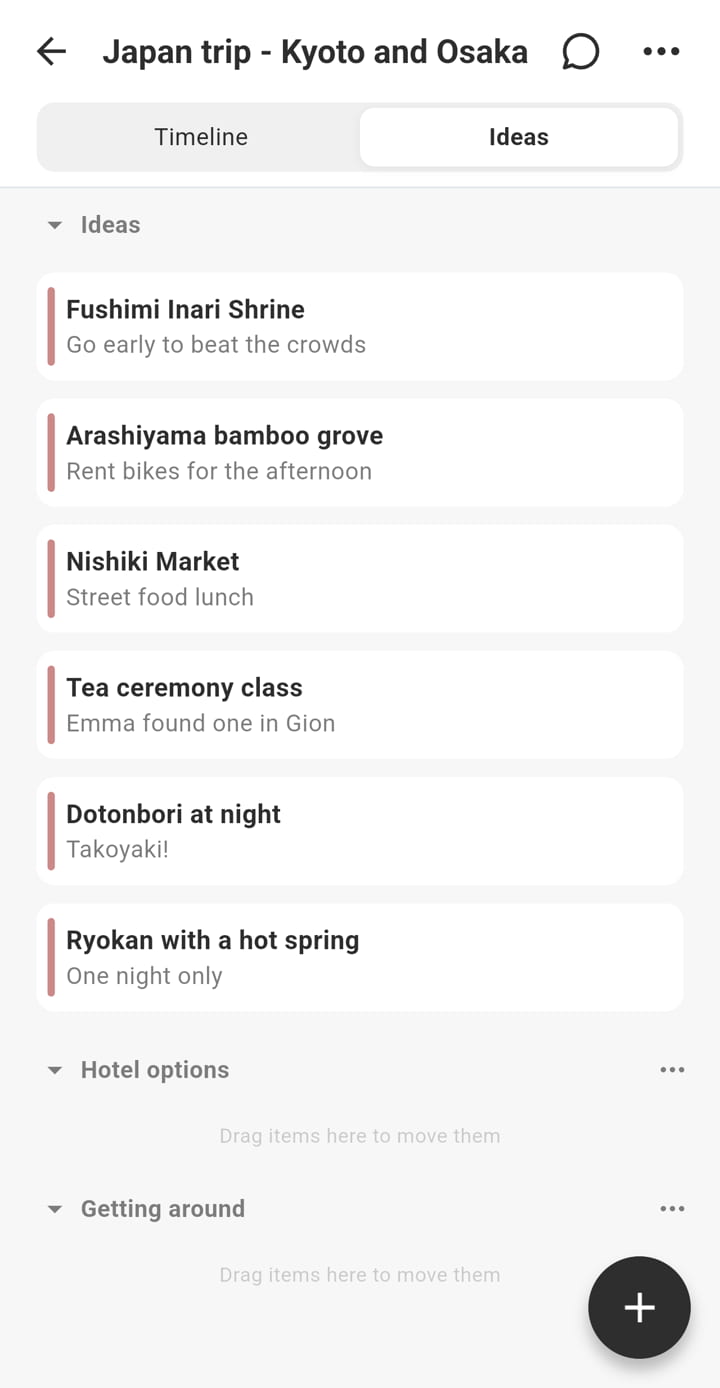
In COUPPLY, add each one with "+" in the Ideas tab. Besides a title, an idea can hold:
- Places, as many as you need. For travel between places, turn on "Transit" to set a departure and arrival.
- Costs, split into items like "1 adult: 30" and "Child: 15."
- URLs, so you never have to hunt for "that website where we saw it."
- Notes and a color, for example yellow for sightseeing and gray for transit.
Ideas are sorted into categories. You start with "Ideas," "Hotel options," and "Getting around," and you can add, rename, and reorder categories as you like. Because the list is shared, each of you can add ideas on your own time, on the commute or before bed, and talk them over later.
2. Agree on a budget
Money is one of the easiest things to leave unsaid and one of the most likely to cause friction mid-trip. Talk about a rough total before you lock in the plan: what you're comfortable spending overall, and where you'd rather splurge (a nice dinner) or save (a cheaper hotel). Also agree on how you'll split travel expenses with your partner: a shared pot, a 50/50 split, or each person paying for certain things. There's no right answer, only the one you both agreed to.
This is where the app helps. If you entered costs on your ideas, COUPPLY does the math for you. The costs of everything placed on the timeline are added up into a trip total, which updates every time you move things around. For a hotel rate you place on several nights but pay once, turn on "Total" for that item and it's counted only once. You can also pick the currency symbol from 15 options, including dollars, euros, and pounds (amounts aren't converted, so enter them in the currency you'll pay in).
One honest limit: COUPPLY shows what the trip costs, not who owes whom. If you split costs item by item, pair it with an expense-splitting app like Splitwise or Tricount.
3. Build a day-by-day itinerary
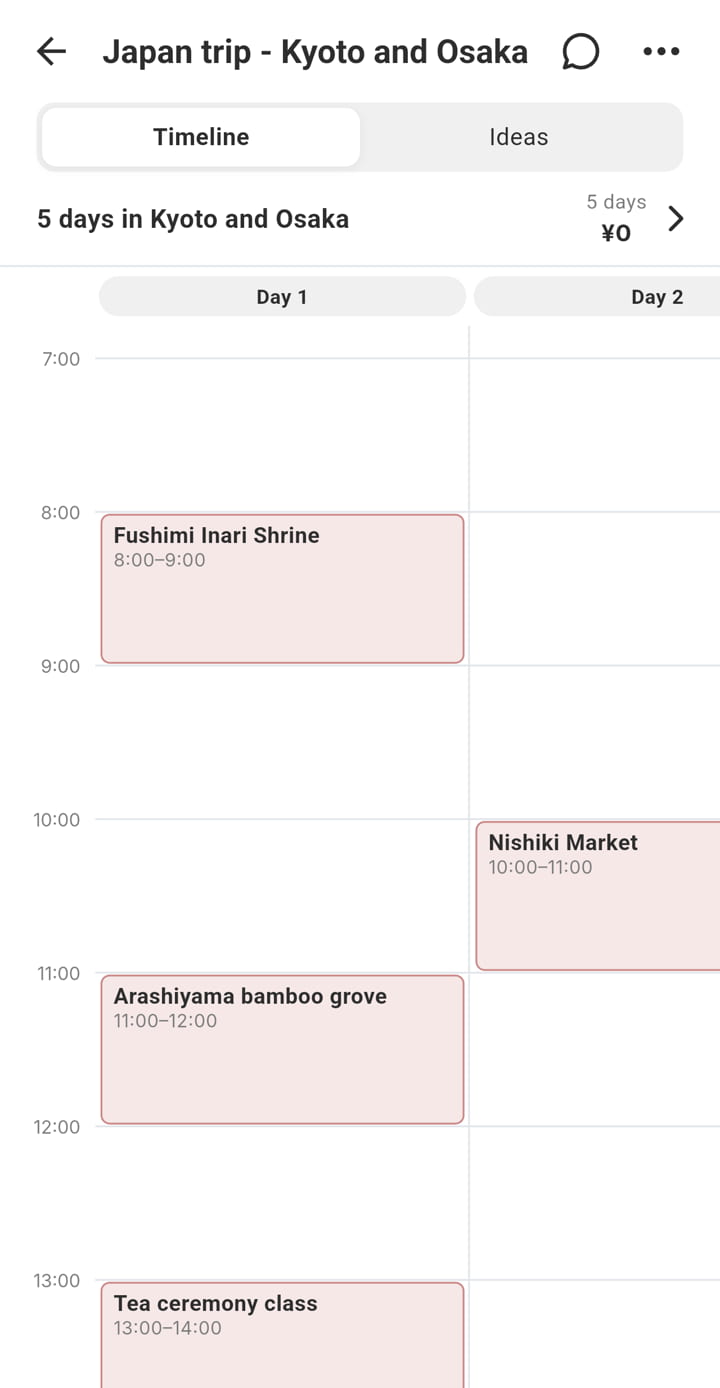
Once you have a handful of ideas, turn them into a schedule. This is the heart of any travel itinerary, and it's much easier when you can move things around instead of retyping a spreadsheet. On the Timeline tab, create a plan by choosing a name and a length, from a day trip up to 30 days.
The timeline looks like a class schedule: time runs down, days run across. Then:
- Drag and drop an idea onto the timeline to place it. Drag it again to move it to another time or day.
- Resize an event with the round handles at the top and bottom when two hours at the museum won't be enough.
- Tap an empty slot to add a one-off event, a comment, or transit. For transit, just pick "Train," "Plane," and so on.
- Put hotel stays in the all-day strip under the day headings, and drag the side handles to cover several nights.
- Leave comments like "Still deciding" as speech bubbles on the timeline.
The part couples tend to like most: you can make several plans for the same trip, such as a relaxed three-day version and a cheaper two-day version, each with its own total. Put them side by side and decide together. And because you both edit the same plan, you can split the work: "Day 2 afternoon is yours. Pick something you want to do."
One tip from couples who travel a lot: leave some blank space. An itinerary with a free afternoon or two leaves room for the café you stumble on, and for rest when one of you is tired.
4. Share and export the itinerary
Between the two of you, there's nothing to send: the plan stays in sync on both phones, and your partner gets a notification when you create or edit a trip plan (if "Trip plans" is turned on in their notification settings). For anyone else, use "Share" in the plan list:
- Save as image: the whole timeline becomes one tall image with the trip total and a color legend. Send it to family or friends, or print it.
- Add to calendar: pick the first day of the trip, and all the events are added to your shared calendar at once. On the day, your usual calendar doubles as the itinerary.
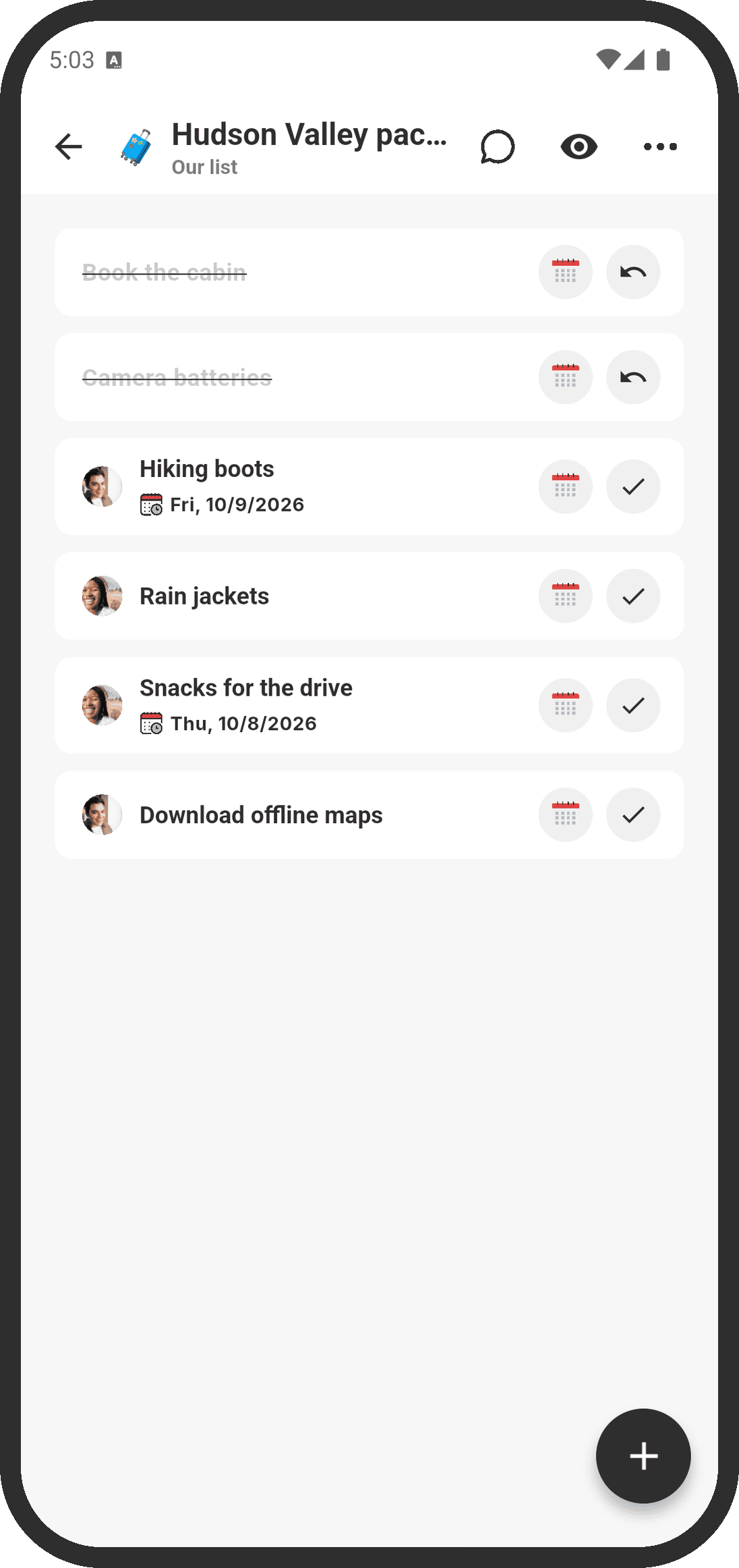
A tip that isn't strictly part of the itinerary: make a shared packing list in Lists, with an assignee for each item, so the charger and the passports both make it into a bag.
5. Keep the memories after the trip
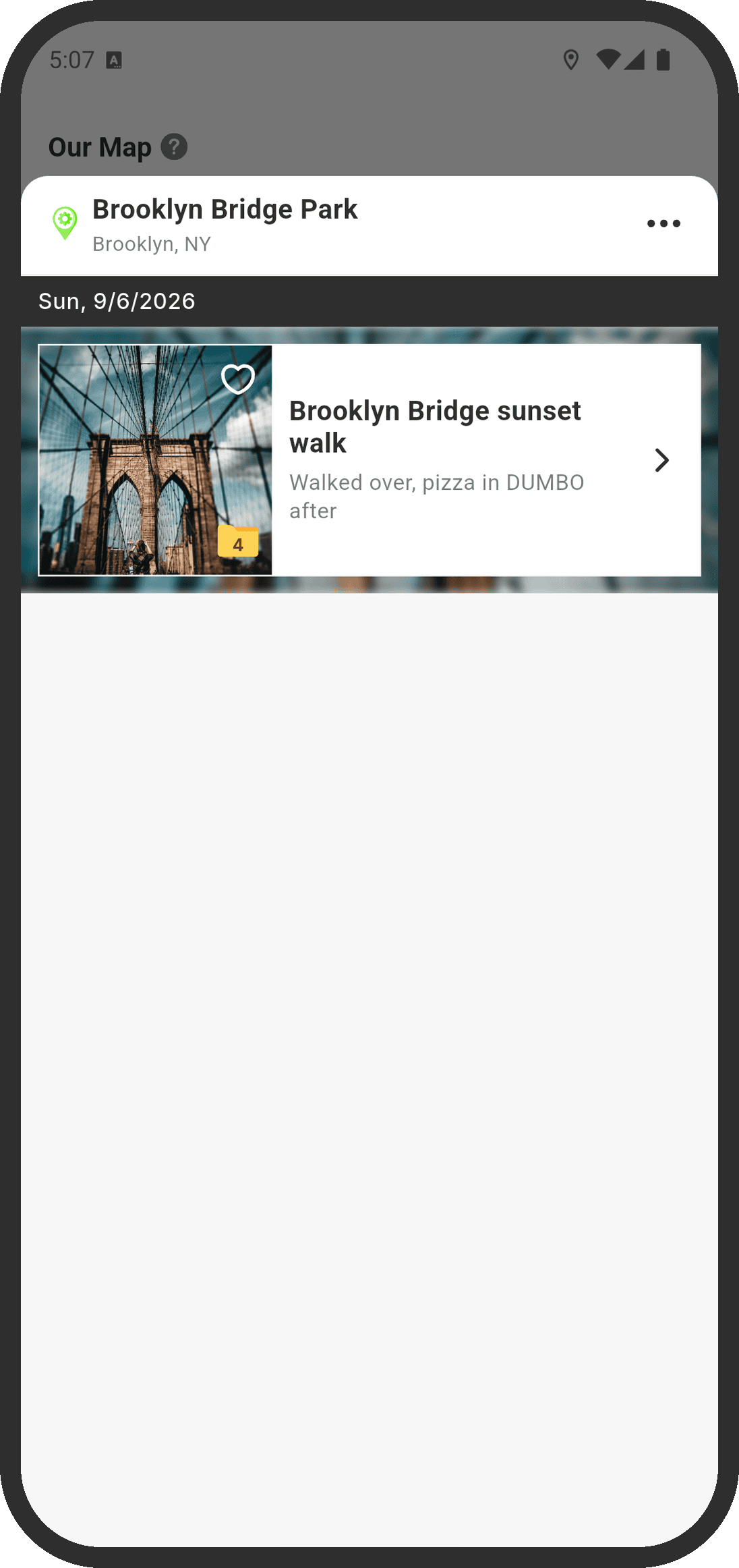
The trip doesn't end when you get home. Upload your photos and videos to Memories, a shared album where each memory can have a title and a journal entry. By default, photos are saved at original quality. If a photo has location info, it appears as a pin on Our Map, so your travels slowly fill in a map of places you've been together. It's a nice way to pick the next destination, too.
Everything here, from your ideas to your photos, is protected with end-to-end encryption, so the COUPPLY team can't read it.
Other trip planner apps and when to use them
COUPPLY's trip planner is built for two people planning together, as part of an app you'd also use for your calendar, chat, and photos. If your situation looks different, one of these may be a better fit. All of them are available on both iPhone and Android, and all have a free version.
Wanderlog
Wanderlog is a dedicated trip planner app with your itinerary on a map, including routes, travel times, and distances between stops. Tripmates can edit the plan together in real time, and the owner can choose who can edit and who can only view. It also has budget tracking with bill splitting, and you can add bookings by forwarding confirmation emails. A paid Pro plan unlocks extras such as Gmail linking and export to Google Maps. It's a strong choice for group trips or road trips with many stops.
Stippl
Stippl is a collaborative trip planner with a day-by-day timeline and a map of your stops. You can plan with friends, track a shared budget, keep packing lists, and record photos and notes in a travel journal as you go. It also offers an AI itinerary generator and offline access to your plans, and a paid Pro plan is available. It suits groups who want planning, budget, and packing in one dedicated travel app.
TripIt
TripIt builds your itinerary from your bookings: forward confirmation emails for flights, hotels, and rental cars, and it organizes them into one trip. You can share a trip with someone and choose whether they can view it, edit it, or edit it as a fellow traveler. TripIt Pro (paid) adds features such as real-time flight alerts, check-in reminders, and seat and fare trackers. It's best for frequent travelers whose trips are mostly bookings rather than sightseeing ideas.
Splitwise and Tricount
Neither of these is an itinerary app. They track shared expenses and show who owes whom, which COUPPLY doesn't do. If you and your partner split costs rather than pooling money, either one pairs well with any of the planners above.
- Splitwise supports equal or unequal splits for trips, roommates, and partners. Splitwise Pro (paid) removes the free version's daily expense limit and ads, and adds receipt scanning and currency conversion.
- Tricount lets you create a group for a trip, add expenses, and see who has paid their share. Its official site describes it as free with no ads, and it includes currency conversion. Tricount is owned by the European bank bunq, but you don't need a bunq account to use it.
Comparison table
| App | Best for | Collaborative editing | Budget | Free |
|---|---|---|---|---|
| COUPPLY | Couples planning from ideas to memories | Yes, for the two of you | Trip total added up automatically | Yes (optional PRO) |
| Wanderlog | Group trips, map-based itineraries | Yes, real time | Budget tracking and bill splitting | Yes (paid Pro) |
| Stippl | Group trips with packing lists and a travel journal | Yes | Shared budget | Yes (paid Pro) |
| TripIt | Organizing bookings from emails | Share a trip with edit access | Not a focus | Yes (paid Pro) |
| Splitwise | Splitting shared costs | Shared expense groups | Who owes whom | Yes, with a daily limit (paid Pro) |
| Tricount | Splitting trip costs in a group | Shared expense groups | Who owes whom | Yes |
How we researched this
We based the descriptions above on each app's official website and its App Store and Google Play listings, checked in October 2026. We only included apps available on both iPhone and Android and updated within the past few months. We didn't rank the apps or test them hands-on, and features and plans can change, so check the official site before you choose.
FAQ
What is the best trip planner app for couples?
It depends on how you travel. If you want one app for the two of you that also holds your shared calendar, chat, and photos, COUPPLY (made by us) is built for that. For group trips or map-heavy road trips, Wanderlog or Stippl are strong choices, and TripIt is best for organizing bookings from confirmation emails.
Is the trip planner in COUPPLY free?
Yes. COUPPLY is free to download and use, and trip plans are included in the free version. COUPPLY PRO is an optional subscription that adds more storage, higher limits, and no ads.
Can we both edit the itinerary at the same time?
Yes. Your partner's changes show up on your screen automatically. If your partner changes something while you're editing, their change is brought in after your save finishes.
Does it work if one of us has an iPhone and the other has Android?
Yes. COUPPLY works on iPhone and Android, and you can share one trip plan across both. Each of you can also use the app in your own language: English, Spanish, or Japanese.
How should couples split travel expenses?
Decide before you book whether you'll pool money or split costs. COUPPLY adds up the trip total from the events on your timeline, so you both know what the trip costs. If you split costs item by item, an expense-splitting app like Splitwise or Tricount keeps track of who owes whom.
Are Wanderlog and TripIt free?
Both have a free version. Wanderlog Pro and TripIt Pro are optional paid subscriptions that add extras: Wanderlog Pro unlocks features such as Gmail linking and export to Google Maps, and TripIt Pro adds features such as real-time flight alerts.
Will my partner be notified when I change the plan?
Yes, if your partner has "Trip plans" turned on in their notification settings. They get a notification when you create a trip plan, or edit one and close the screen. Comments on the timeline always send a notification.
Wrap-up: one shared plan, from first idea to last photo
Planning a trip together works best when you both see the same plan. Talk about what you each want, collect ideas as you find them, agree on a budget, arrange a day-by-day itinerary, share it, and save your photos when you're back. With COUPPLY you can do all of that in one free app:
- Save places, hotels, and transit as ideas, with costs and links
- Drag and drop them onto a timeline to build your itinerary
- Edit together, with changes synced to both phones
- See the trip total and compare several plan options
- Save the plan as an image or add it to your shared calendar
COUPPLY works on iPhone and Android, so it's fine if one of you has an iPhone and the other an Android phone. It's available in English, Spanish, and Japanese, and each of you can use your own language. Try it for your next trip together.