
Track and share periods
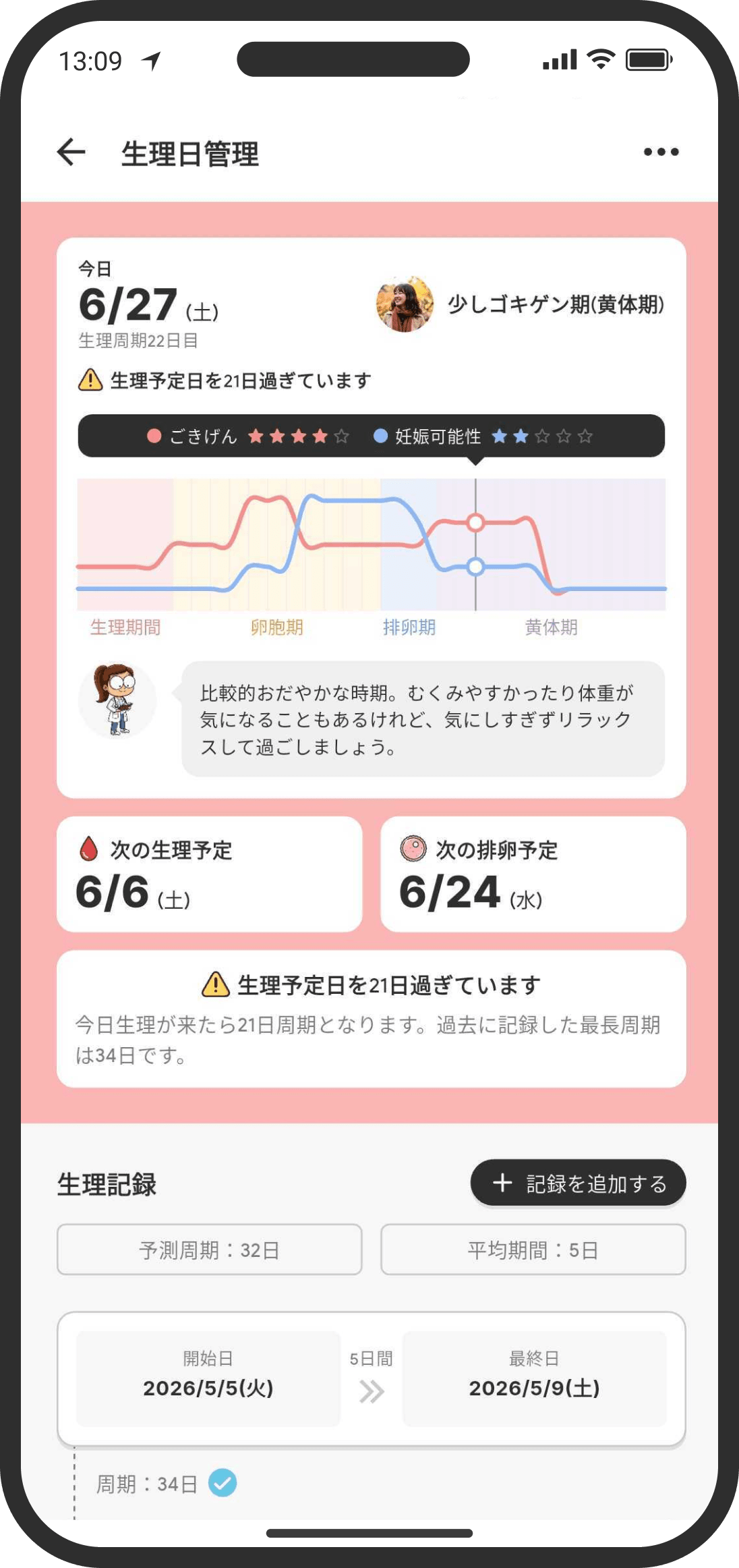
Many couples go through misunderstandings caused by their body's natural rhythms. In COUPPLY, the calendar and user widget show at a glance how someone is likely feeling that day. Give the sharing settings a try.
What is it?
A simple period tracker that you can choose to share with your partner. Based on your period records and cycle, it predicts your next period, your ovulation day, your most fertile days, and your PMS days. You decide which items to share with your partner. The more you record, the better it matches your own pattern.
How to use it
- Finish the setup in the Period tracker to turn it on. Predictions start as soon as you have at least one record.
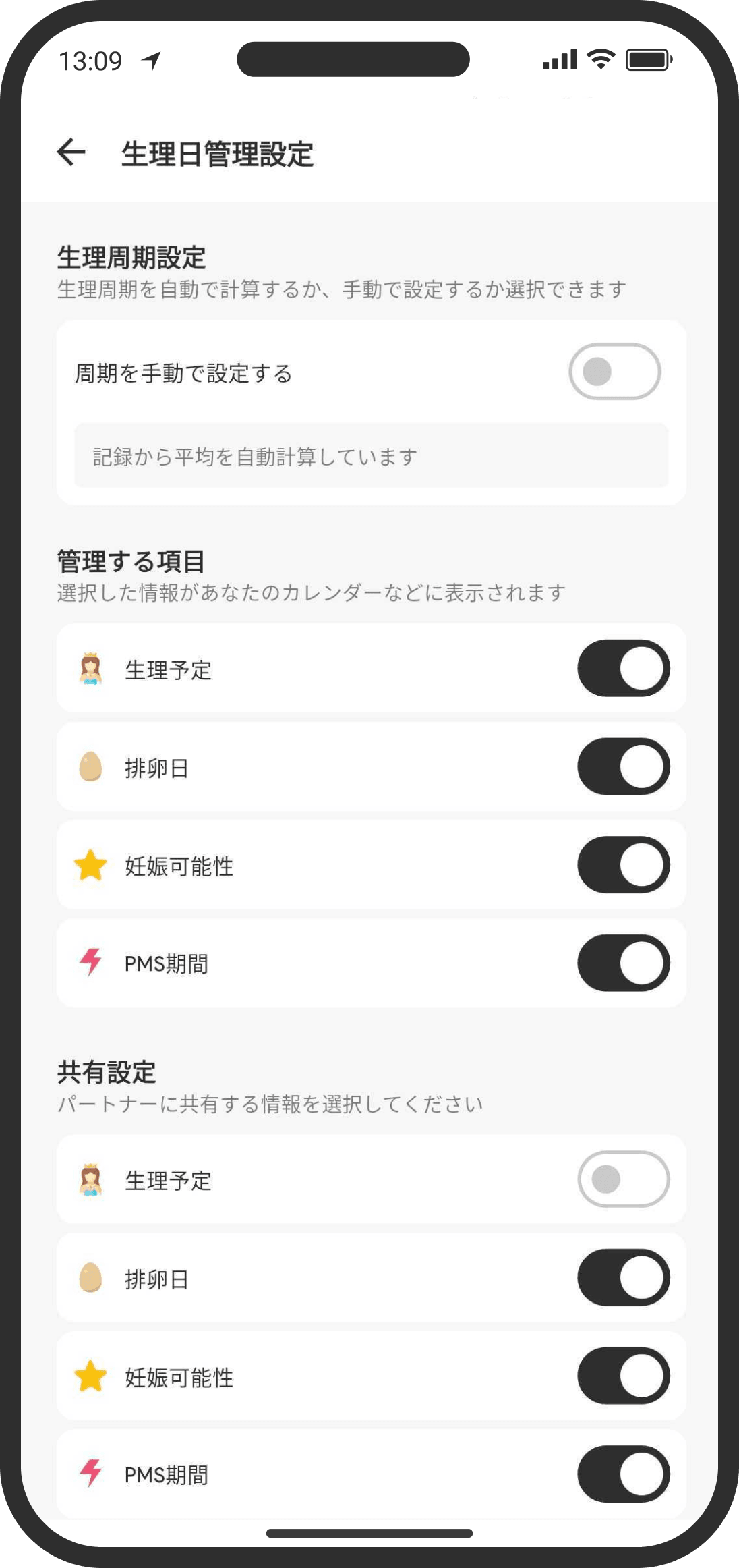
- For the items it shows ("Predicted period," "Ovulation day," "Fertility," and "PMS"), you can set "Items to track" (what shows on your own screen) and "Sharing" (what your partner can see) separately. Set them during setup, or change them later from the "..." in the top right of the Period tracker.
- If you want to set your cycle length and period length yourself, you can switch to setting them manually.
- For the icons shown on the calendar and in the user widget on the Home screen, choose one of 4 designs for each item in "Icons" from the "..." in the top right of the Period tracker. Besides the blood drop, you can choose other designs, like a moon.
- Long-press a period record to delete it.
- When you record the day your period started or ended, and that day is today or within the last few days, you'll be asked "Notify your partner?" Choose "Notify" only when you want to, and your partner gets a notification like "(Your name)'s period started today." If you don't want to notify them, cancel and nothing is sent.
- Even if you don't track your own periods, when your partner uses the Period tracker and shares it with you, opening the Period tracker (from search, the "Health" tab in the bottom navigation, or a notification from your partner) shows how your partner is feeling. You'll see what their current phase is like and a short tip on how to look out for them. To start logging your own periods, tap "Track my own periods" at the bottom.
- To stop tracking, open the "..." in the top right of the Period tracker and use "Reset period records" at the very bottom. This deletes all your records and turns off the Period tracker.
- Use "Mode" at the very top of the "..." menu in the top right of the Period tracker to switch between "Natural cycle," "I'm on the pill," and "Pregnant."
- I'm on the pill: You log your pill on the Pill tracker screen (see "Track your pill" below). While you're on the pill, ovulation, fertile window, and PMS predictions are paused, and the Period tracker is used only to log your periods. Choose "Natural cycle" to stop tracking your pill and go back to period predictions.
- Pregnant: This starts when you add your baby's due date as an anniversary. (Tap "Add due date" on the Pregnancy page to open the new anniversary screen with the name "Due date" and the type "Birthday" already filled in. You can also add it from the screen you see when you first open the Period tracker.) If you're tracking your pill, you can add it from "Add due date (if you're pregnant)" in the "..." menu in the top right of the Pill tracker, and your pill tracking ends automatically. Period predictions (next period, ovulation, fertile window, and PMS) are paused for the person who's pregnant, and the Home screen shows the week, like "Week 6 of pregnancy." Tap it to open the Pregnancy page, where you can see how your baby is doing now (an illustration and a short note for each stage), how many weeks along you are, how many days are left until your due date, and "Things you can do now." These include when you might first feel movement, getting baby essentials and your hospital bag ready, parenting classes, thinking about a new home or car, and what to expect after your due date. Below that, "Tips from COUPPLY" lets you quickly create a folder for documents or a hashtag for photos. On the calendar, the month view shows the week under the first day of each week, like "Week 8 of pregnancy," so you can use it as a guide when making plans. In the week view, "Month 3 of pregnancy (weeks 8–11)" appears in the same place as period predictions. Tap a date to see the week of pregnancy and that day's events. These show for both of you, even if your partner doesn't use the Period tracker. Your period records stay as they are. Tap a week on the timeline at the top of the Pregnancy page ("Week 0," "Week 1"… "Due date," the week you're viewing is shown with a thick black line and a black dot on the day, and a pink dot marks today) or swipe left or right to move one week at a time and look ahead or back (your baby at that stage and "Things you can do at this stage"). Tap "Today" in the top right to go back to this week. When you open the page from "Open Pregnancy page" in a day's details on the calendar, that day's week is shown.
FAQ
Q. I was sharing my periods, but my partner couldn't see them anymore
Because of an earlier bug, the period item in "Sharing" was sometimes turned off by accident when your partner opened the calendar (this has been fixed). If your partner can't see your periods, turn the period item back on in "Sharing" from the "..." in the top right of the Period tracker.
Q. I don't want my partner to see it
You can turn off sharing for each item. If you turn them all off, nothing appears on your partner's calendar. You can also choose to show items only on your own calendar and hide them from your partner.
Q. What does my partner see? Are they notified?
Only the items you've turned on for sharing appear as events on your partner's calendar. Just adding a record doesn't notify your partner automatically. The only exception is when you record the day your period started or ended: if that day is within the last few days, you'll be asked "Notify your partner?" Your partner gets a notification only if you choose "Notify" there. (Your partner needs to have notifications allowed.)
Q. Does the icon I choose show on my partner's screen too?
Yes. Your partner's calendar and Home screen show the icon you chose. If you'd rather not have the blood drop, switch to another design and it changes on your partner's side too. Your partner isn't notified; the new icon appears the next time they open the screen. Likewise, if your partner tracks their own period, their entries show with the icons they chose.
Q. Will I get notifications?
Turn on "Period tracker reminders (day before)" in your notification settings to get a reminder at 8 AM on the day before your predicted period, ovulation day, and PMS days (or, if you're on the pill, your bleeding phase and sensitive phase). It's off at first. If your partner shares their periods with you, you'll also get reminders for theirs. In the same way, if your partner turns this on, they get reminders for the items you share (items you've stopped sharing aren't sent). These reminders arrive even if predicted periods aren't shown on your calendar.
Q. Can my partner see my pregnancy? Are they notified?
The week of pregnancy and "Things you can do now" are shown to both of you (there's no setting to hide them from your partner). When you add the anniversary, it's recorded on your partner's timeline, just like any other anniversary.
Q. I want to turn off pregnancy mode
Choose "Turn off pregnancy mode" from the "..." in the top right of the Pregnancy page. You won't be asked why, and your partner isn't notified. Next, you can choose whether to keep or delete the anniversary you added. Once it's off, predictions resume when you log your next period. The time you were pregnant is left out of your average cycle automatically.
When your baby is born, choose "Baby has arrived" from the "..." in the top right of the Pregnancy page. Pregnancy mode ends, and the anniversary becomes your baby's birthday. The Pregnancy page turns into a celebration page with the anniversary settings to update (name, birthday, and note; if the birthday is different from the due date, change it to the day your baby was born) and an "Open anniversary" button. Pregnancy mode also ends the same way if you change the anniversary date to today or earlier and choose "Set as birthday." From the "..." in the top right, you can also show or hide the tab in the bottom navigation.
For 60 days after the birth, you can open this page from "Open Pregnancy page" in the Period tracker message (or, on your partner's screen, in the Health tab). The Period tracker of the person who was pregnant pauses predictions until the next period is logged (a note also appears in the calendar's date details). Bleeding in the first 6 weeks after the birth isn't a period, so logging it doesn't restart predictions. Your partner's screen shows "Predictions are paused until the next period starts."
During pregnancy, your partner's Health tab shows the Pregnancy page as is. (If your partner also uses the Period tracker, their own records appear there instead, so they can open the page from "Week ◯ of pregnancy" on the Home screen.)
In your period log, cycles that span a pregnancy or a time on the pill show that period. These are left out of the prediction automatically. If you turned pregnancy mode off, the log doesn't mention the pregnancy and only shows "Excluded from prediction."
Q. The predictions are off
Your cycle is calculated automatically from 2 or more records. Records with an unusually long or short cycle (roughly shorter than 24 days or longer than 38 days) are left out of the calculation automatically. If needed, you can put one back in with "Include." The more you record, the more accurate it gets.