Long Distance Relationship Apps for Couples: 7 Free Picks for 2026
The best long distance relationship apps don't try to do everything. Most couples end up with three: one private place where the relationship lives day to day, one app for calls, and one or two for fun, like watching a movie together or answering a question before bed.
This guide sorts long-distance apps by what you actually need, from staying in touch across time zones to planning the next visit, and suggests a simple setup that works on iPhone and Android. What we say about other apps comes from their official websites and store listings, checked on November 3, 2026.
Disclosure: we make COUPPLY. We list it first, and we describe every other app only from what its developer states.
Key takeaways
- Long-distance couples need five things from apps: a private place to talk, calls, a shared calendar across time zones, something to do together, and a way to keep memories.
- All seven picks are free to start. COUPPLY, Between, Locket Widget, Paired, and Gottman Card Decks run on both iPhone and Android. Teleparty runs in a web browser.
- For watching movies together, Teleparty syncs Netflix, Disney+, Prime Video, and others in your browser. On Apple devices, SharePlay in FaceTime does something similar.
- For feeling close between calls, home screen widgets help: Locket shows each other's photos, and COUPPLY widgets show your shared calendar and how long you've been together.
- COUPPLY doesn't include calls, so pair it with the calling app you already use.
What long-distance couples need from apps
When you live apart, apps aren't extras. They're where most of your relationship happens between visits. In practice, long-distance couples need:
- A private place to talk every day, away from group chats and work messages, where plans and small updates don't get lost.
- Calls, voice and video, that work on both of your phones.
- A shared calendar that shows calls, flights, and the next visit, even when you live in different time zones.
- Something to do together: watching a show, playing a game, or answering questions that go beyond "how was your day?"
- A place to keep memories from each visit, so the time together adds up to something you can look back on.
No single app does all five well, so the picks below are grouped by the job they do.
The best long distance relationship apps
1. COUPPLY: a private home base for the two of you
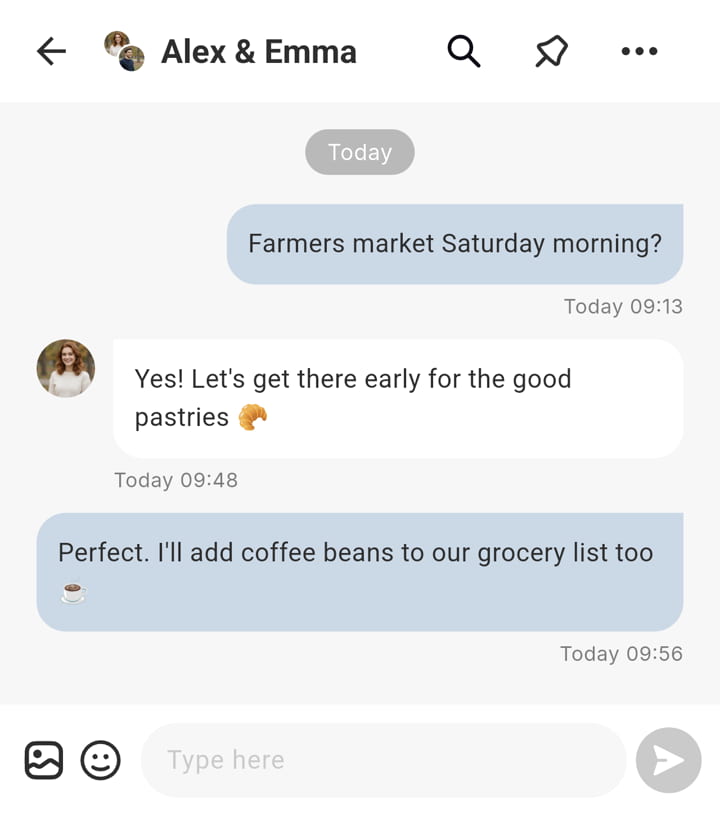
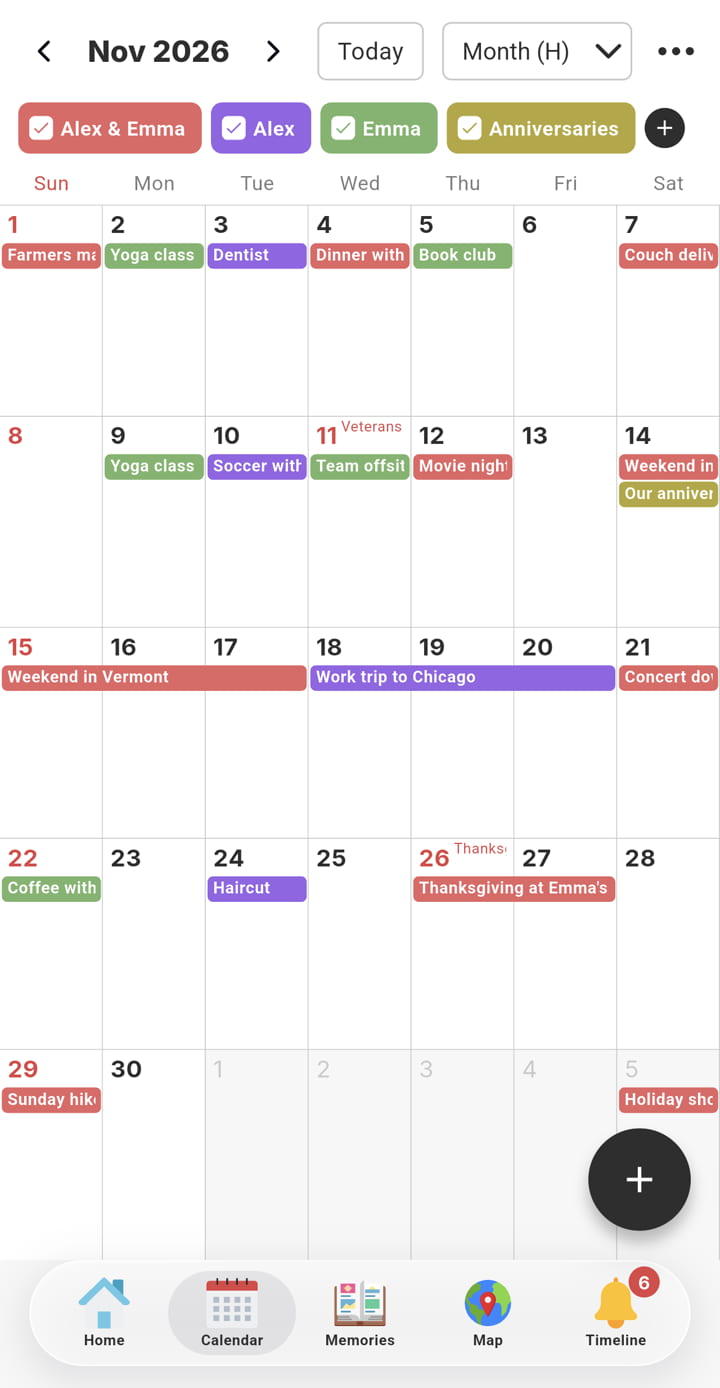
COUPPLY is an all-in-one couples app for iPhone and Android. For a long-distance couple, it's the place where the relationship lives between calls. Chat is organized into threads by topic, so "next visit" planning doesn't get buried under daily messages, and the shared calendar holds both of your plans. Each of you can set the app's time zone, so dates and times appear in your own local time.
Between calls, small features keep you in touch. Share your mood or a short status update so your partner knows how your day is going, or send a nudge: a push notification with any message you like. Home screen and Lock Screen widgets show your shared calendar and, on iPhone, how long it's been since your anniversary. After each visit, Memories keeps your photos and a journal, and Our Map shows the places you've been together.
Things to know: COUPPLY doesn't include voice or video calls, so you'll still need a calling app. Everything you save is end-to-end encrypted, and each of you can use the app in English, Spanish, or Japanese.
| Platforms | iPhone, Android |
|---|---|
| Price | Free; optional COUPPLY PRO subscription (one partner subscribes, both get it) |
| Best for | Keeping chat, plans, and memories in one private place |
2. Between: private chat with free calls
Between is one of the best-known couples apps. Its official site describes a private space for two with chat, shared photos and videos, anniversaries, a shared calendar, and free voice calls. If you want your calls in the same app as your chat, it's the most direct option. It's on iPhone and Android, and the app is in English, Japanese, Korean, Chinese, and Thai.
| Platforms | iPhone, Android |
|---|---|
| Price | Free; Between Plus optional |
| Best for | Couples who want chat and calls in one couples app |
3. Locket Widget: photos on each other's home screen
Locket Widget puts live photos from your closest people on your home screen. Its App Store listing describes it as a widget that shows live photos from your best friends right on your home screen, and long-distance couples use it the same way: you snap a photo, and it appears on your partner's phone without them opening anything. It's free on iPhone and Android, with an optional Locket Gold subscription.
| Platforms | iPhone, Android |
|---|---|
| Price | Free; Locket Gold optional |
| Best for | Small, everyday glimpses of each other's day |
4. Teleparty: watch movies together
Teleparty, formerly Netflix Party, syncs video playback and adds a chat, so you can watch the same movie or show at the same moment. Its site lists Netflix, Disney+, Hulu, HBO Max, Prime Video, and YouTube. It works as an extension for Chrome, Edge, and Safari, so it's best on a computer. It's free to get, with premium features available.
If you both use Apple devices, SharePlay in FaceTime lets you watch together during a call in supported apps.
| Platforms | Web browser (Chrome, Edge, Safari) |
|---|---|
| Price | Free; premium features available |
| Best for | Long-distance movie nights |
5. Paired: daily questions and games
Paired gives you a question to answer each day, then shows you each other's answers. The free version includes the daily questions, and Paired Premium adds guided journeys, expert-led topics, and games and quizzes, including content for long-distance couples. One subscription covers both of you. It's on iPhone and Android, in English, French, and German.
| Platforms | iPhone, Android |
|---|---|
| Price | Free; Paired Premium optional (covers both partners) |
| Best for | Conversations that go beyond the daily check-in |
6. Gottman Card Decks: questions for your next call
Gottman Card Decks, from the Gottman Institute, is a free app with 14 decks and more than 1,000 cards of questions and prompts. You don't need to set anything up together: open a deck during a video call and take turns asking.
| Platforms | iPhone, Android |
|---|---|
| Price | Free |
| Best for | Video calls that need something new to talk about |
7. Your usual video calling app
You don't need a couples app for calls. FaceTime, WhatsApp, and Google Meet are free and probably already on your phones. The one thing to check is that it works on both: FaceTime is built for Apple devices, so if one of you uses Android, WhatsApp or Google Meet is the simpler choice.
Comparison table
Based on each developer's official website and store listings (November 3, 2026).
| App | What it's for | iPhone & Android | Price | Calls |
|---|---|---|---|---|
| COUPPLY | Chat in threads, shared calendar, widgets, memories | Yes | Free; PRO optional | No |
| Between | Chat, photos, anniversaries, calendar | Yes | Free; Plus optional | Free voice calls |
| Locket Widget | Photos on each other's home screen | Yes | Free; Gold optional | No |
| Teleparty | Watching shows and movies together | Browser extension | Free; premium optional | Chat only |
| Paired | Daily questions, quizzes, games | Yes | Free; Premium optional | No |
| Gottman Card Decks | Question cards for calls | Yes | Free | No |
A simple long-distance app setup
Too many apps can make a relationship feel like a to-do list. A setup that works for most long-distance couples:
- One home base for chat, plans, and memories, such as COUPPLY or Between. Pick the one you'll both open every day.
- One calling app that works on both phones.
- One thing for fun, chosen together: Teleparty if you like movie nights, Paired or Gottman Card Decks if you like talking, Locket if you like sending photos.
Try it for two weeks, then talk about what you actually used. Drop the rest.
Tips for different time zones
- Add your partner's city to your phone's world clock, so you always know what time it is for them before you call.
- Set your calendar to your own time zone. In COUPPLY, each of you chooses the app's time zone in Settings, and the calendar shows times in it. If you travel, change it there, because the app doesn't switch on its own.
- Pick a regular call time that's reasonable for both of you, and put it on the shared calendar as a repeating event.
- Send something the other person will see when they wake up, like a photo, a status update, or a note in your thread. It closes the gap when your days don't overlap.
Planning the next visit together
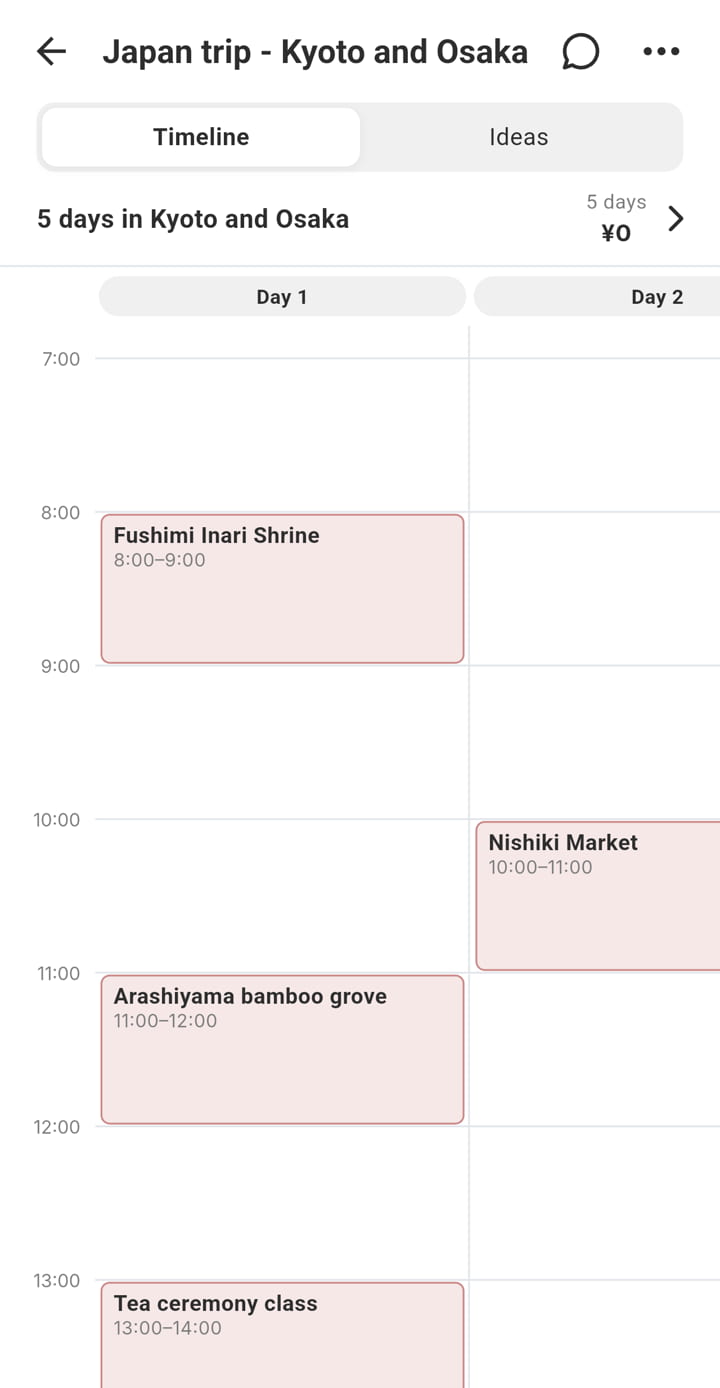
Having the next visit on the calendar can make the time apart easier. Put the dates on your shared calendar as soon as you book, and plan the details together. In COUPPLY, a trip plan lets you both add ideas, places, and bookings, then arrange them by day. For more on this, see our guide to planning a trip together.
After the visit, save the photos to a shared album and write a few lines about it. On the hard days, looking back helps more than you'd expect.
FAQ
What are the best free apps for long-distance couples?
COUPPLY, Between, Locket Widget, Paired, and Gottman Card Decks are all free to start on iPhone and Android, and Teleparty is free in a web browser. Most couples combine a private app for chat and plans, a calling app, and one app for fun.
What app can long-distance couples use to watch movies together?
Teleparty syncs playback on Netflix, Disney+, Hulu, HBO Max, Prime Video, and YouTube, with a chat on the side. It runs as a browser extension for Chrome, Edge, and Safari. If you both use Apple devices, SharePlay in FaceTime lets you watch together during a call in supported apps.
Which long distance relationship apps work on iPhone and Android?
COUPPLY, Between, Locket Widget, Paired, and Gottman Card Decks all run on both. For calls, WhatsApp and Google Meet work across iPhone and Android, while FaceTime is for Apple devices.
Is there a widget for long-distance couples?
Yes. Locket Widget shows photos from your partner on your home screen. COUPPLY has home screen widgets for your shared calendar and today's plans, and on iPhone a Lock Screen widget that shows how long it's been since your anniversary.
Can apps replace calls in a long-distance relationship?
No. Apps are best for the time between calls: sharing small updates, keeping plans in one place, and giving you something to talk about. Regular calls and visits still matter most.
Does COUPPLY have video calls?
No. COUPPLY doesn't include voice or video calls, so use it alongside the calling app you already use. COUPPLY keeps your chat, shared calendar, lists, and memories in one end-to-end encrypted place.
Which long-distance apps should you use?
Start with a calling app that works on both of your phones, then add one app for fun: Teleparty for movie nights, Paired or Gottman Card Decks for conversations, or Locket for photos. If you want calls inside your couples app, Between offers free voice calls.
If you want one private place where your chat, calendar across time zones, plans for the next visit, and memories all live, end-to-end encrypted, on iPhone and Android, try COUPPLY for free.