


Settle a fight in court
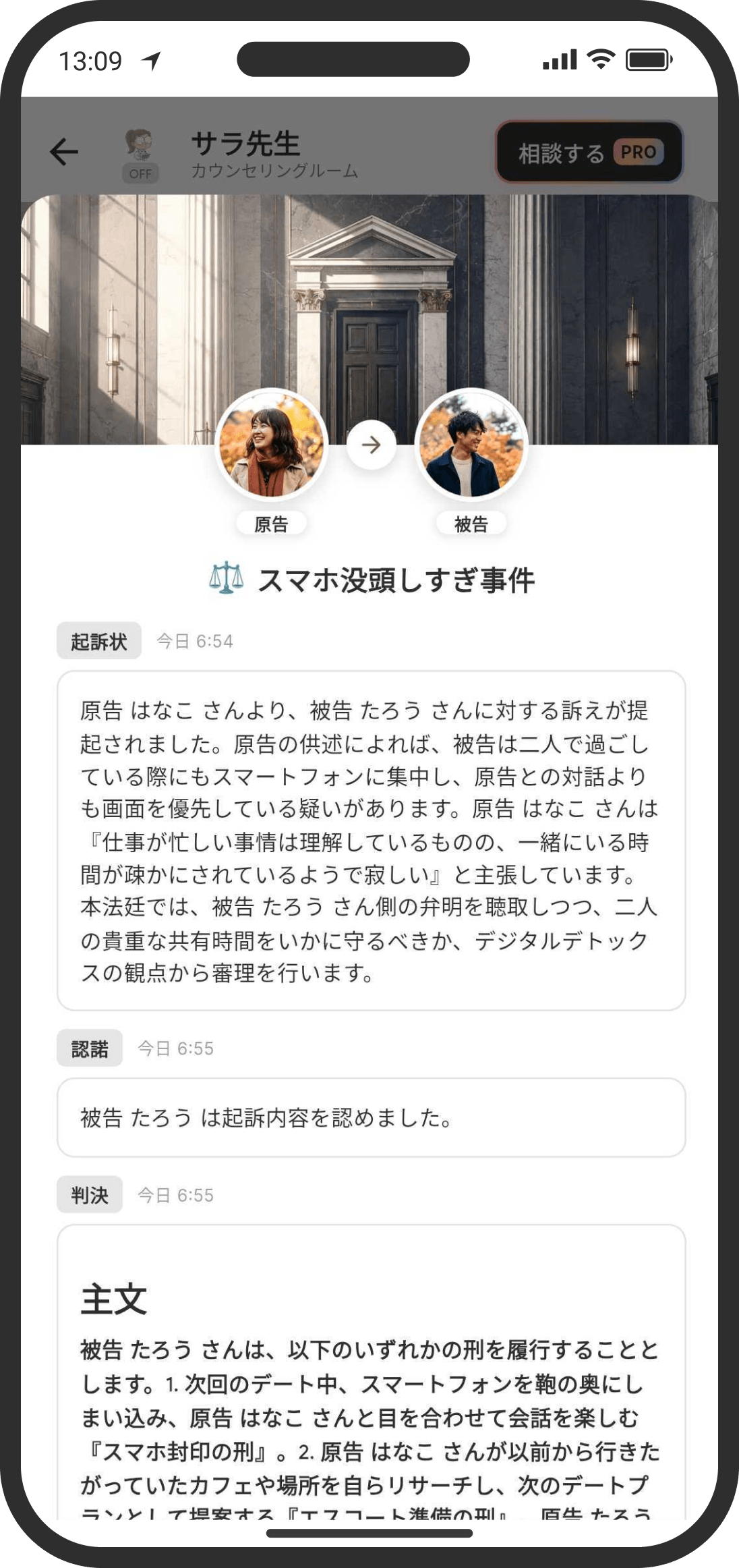
The AI mediates your fight. When an argument starts, either of you can suggest, "Let's settle this in court!"
What is it?
The counselor plays the judge (the AI jury), hears each side of your fight, and helps you settle it. In the verdict, the counselor gives "the ruling (including the sentence)," "the share of responsibility," and "the reasons for the verdict."
Filing charges (plaintiff)
- On the counselor screen, choose the "Court" chip to open the step-by-step screen.
- In the free-text box under "First, describe the charges," write what you want to bring to court (for example: "Last night you didn't reply and I got anxious. If you were busy, I wish you'd just said so.").
- Tap "Create the indictment," and the AI creates a case name (a short label, such as "The Case of the Ignored Message") and the text of the indictment. This uses food (tokens with COUPPLY PRO).
- To change the wording, write how you'd like it changed in the box below and tap "Revise," and the AI will regenerate it (this uses more food).
- If you're happy with it, tap "File these charges." The indictment is posted in the counseling room, and the defendant is mentioned.
Reviewing the charges (defendant)
- Tap the indictment in the counseling room to open the charges screen.
- Read the indictment and choose a button.
- "Objection!": Takes you to the screen for writing your defense.
- "I admit it": Treats the charges as fully admitted, skips the follow-up questions, and goes straight to the verdict.
Writing your defense (defendant)
- Write your side of the story in free text and submit it. The AI turns it into a formal statement, and your defense is posted in the counseling room.
- After you submit it, the AI decides whether it can reach a verdict or needs to ask more questions.
Answering follow-up questions
- If the AI decides it wants to know more, it posts a follow-up question to either the plaintiff or the defendant, with a mention.
- Just like the defense, answers are turned into formal statements by the AI before they're posted.
- Once there's enough information and the AI decides it can reach a verdict, it moves on to the verdict.
Receiving the verdict
- The AI posts the ruling (the sentence), the share of responsibility, the reasons for the verdict, and a message to help you make up in the counseling room. That ends the case.
- The verdict may also be kept in the counselor's notes.
Checking past cases
- Long-press the "Court" chip at the bottom of the counseling room to see your past cases.
- Filing charges and the verdict are also recorded in the timeline (the back-and-forth of the defense and follow-up questions only sends notifications and isn't kept in the timeline). The card shows the case name. Tap it to open the counseling room. The indictment and the reasons for the verdict don't appear in the timeline.
FAQ
Q. Do I have to wait for my partner to respond?
Yes. After you file charges, the next step is waiting for your partner's defense. After that, depending on the case, the counselor may ask follow-up questions that you'll need to answer too.
Q. Does my partner get a push notification?
Yes. Your partner gets a push notification when charges are filed, when a defense is submitted, when a question is asked, and when the verdict comes in. The notification only says "There's an update in your case" and doesn't show the indictment or the verdict. At each step, an @mention is also shown for the person concerned. Filing charges and the verdict are also recorded in the timeline, so you can catch them later even if you miss the notification.
Q. Will my partner see exactly what I wrote?
The counselor rewords it so it doesn't come across as harsh before posting it. Aggressive wording or anything that attacks the other person's character is softened.
Q. How much food does it use?
Creating and revising the indictment, the AI's review after each defense or answer, and generating the final verdict each use food based on the tokens actually used. Generating the verdict is the heaviest step, using about 2 to 3 times as much as the other steps. With COUPPLY PRO, no food is used, and you can keep going until you reach that day's token limit.
Q. What happens if I choose "I admit it"?
The follow-up questions are skipped, and it goes straight to the verdict. The AI reaches its verdict assuming the defendant has fully admitted the charges.