


Organize info with data pages
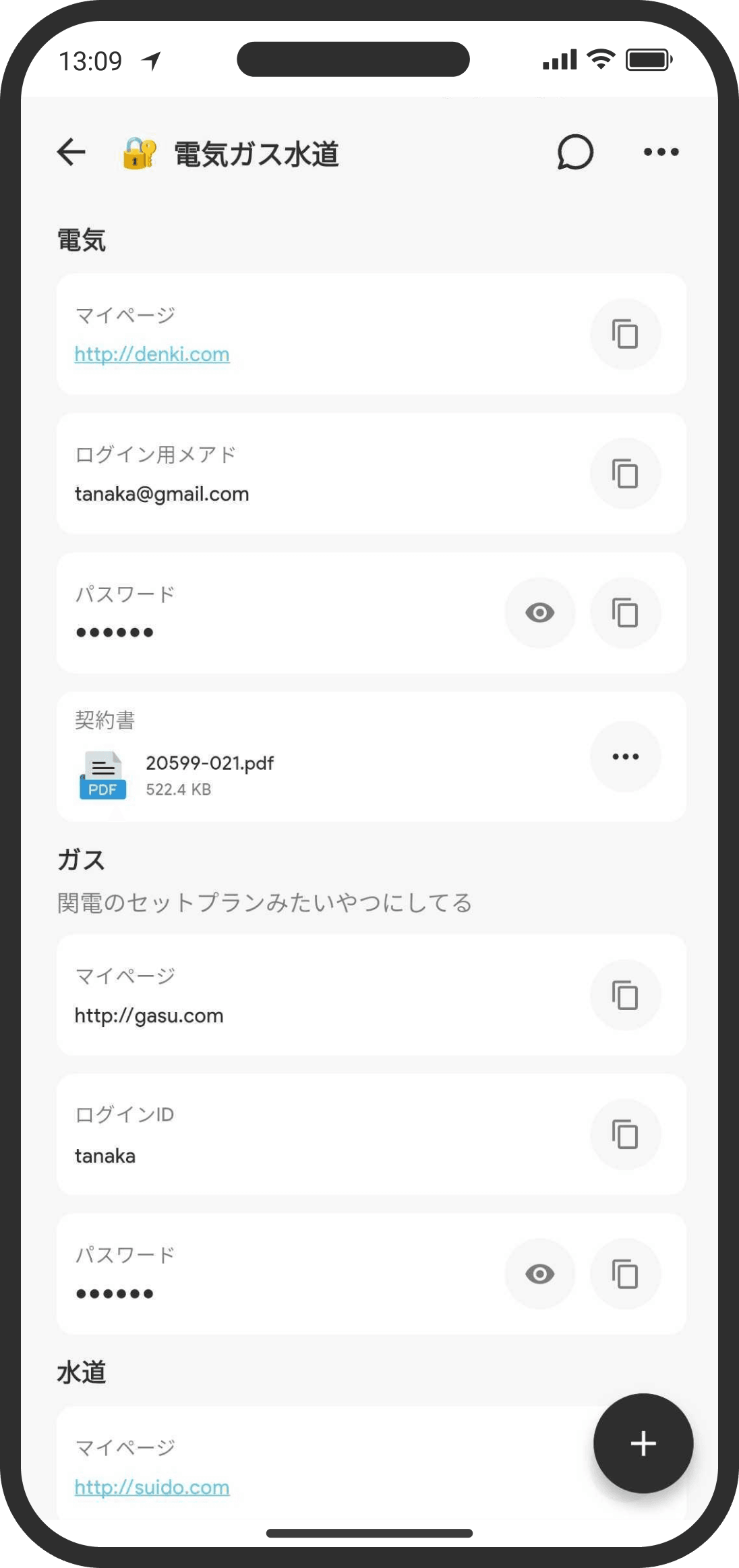
Compared with "Memo," this format is better for sharing structured info like IDs and passwords. You can copy a password with one tap.
What is it?
A page in "key-value" format (label: content) where you add fields one at a time and arrange them from top to bottom. There are 6 field types: "Heading," "Description," "Text," "Password," "URL," and "File." Anything you'd rather not show can go in a "Password" field. It's hidden as dots (●●●●●●), and you only see it when you tap the eye icon.
How to use it
- On the Home screen, tap "+" at the top right of "Top," then "Data" (in Custom mode, you can also create one from "+" on the Wiki tab).
- When you create it, you can set an icon, a title, and a description.
- Add fields with "+" at the bottom right. Choose a type and enter the content. Here's how each type works:
- Heading: Large bold text (a section heading). Tap to edit.
- Description: Small light-gray text (a note). URLs in the text become links automatically.
- Text: Regular text. Long-press to select and copy.
- Password: Always shown as "●●●●●●." Tap the eye icon on the right to show it for a moment.
- URL: A blue underlined link. Tap to open it in your device's browser.
- File: Attach one file per field (photo, video, or document).
- Drag fields to change their order.
FAQ
Q. How is this different from a memo?
A memo is for free-form writing. Data is for when you want to keep things neatly organized field by field.
Q. Is a "Password" field hidden again the next time I open it?
Yes. Showing it with the eye icon is only temporary. Reopen the screen and it's hidden again.
Q. Is it safe to store important info like passwords?
COUPPLY is encrypted, so your data is shared only between the two of you and nobody else can see it. Just keep in mind that your partner can see it.
Q. Will my partner be notified when I make changes?
Yes. When you create a data page, or edit one and close the screen, your partner gets a notification if "Data pages" is turned on in their notification settings.
Q. Can search find what's inside?
Yes. Wiki search covers field labels, field values, and attached file names.